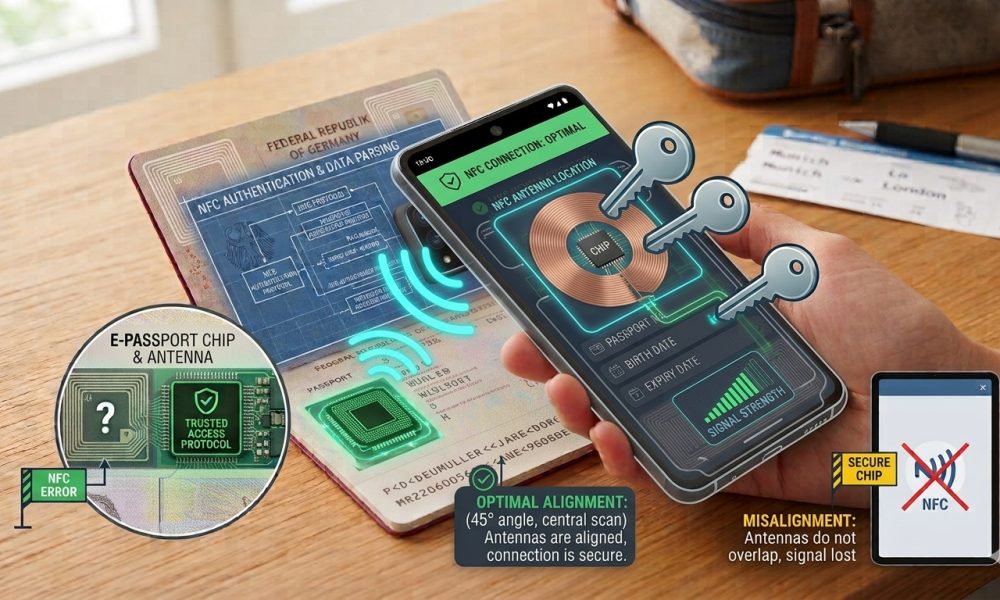
Device compatibility, antenna alignment, protective cases, and document condition can affect contactless reading.
WASHINGTON, DC, October 2, 2026 — A smartphone that fails to detect an electronic passport chip does not automatically prove that the document lacks a functioning contactless component, because several practical factors can interrupt communication before the Application successfully establishes a stable NFC session.
Phone hardware, operating-system support, antenna placement, protective cases, document positioning, Application compatibility, physical wear, and incorrect preliminary document capture can all influence whether an otherwise legitimate electronic passport responds successfully during a consumer smartphone scan.
NFC Detection Depends on Several Components Working Together
A successful mobile passport scan requires the smartphone hardware, operating system, passport-reading Application, document-access information, contactless antenna, embedded chip, and physical positioning to function together during the same interaction.
A problem affecting any one of those components can prevent successful detection, which is why troubleshooting should avoid treating a single failed attempt as definitive evidence concerning the passport’s authenticity or electronic condition.
Not Every Smartphone Handles Passport NFC Equally Well
Many modern smartphones include Near Field Communication hardware. Still, performance can vary significantly among devices because antenna design, controller sensitivity, operating-system restrictions, and Application interfaces differ across manufacturers and model generations.
A passport that reads immediately on one handset may require more careful positioning on another, even when both phones technically support NFC and run compatible passport-reading software.
The Operating System Also Matters
Mobile operating systems control how applications interact with NFC hardware, meaning supported functions and communication behavior can depend partly upon whether the user has a compatible version of iOS, Android, or another supported platform.
Purpose-built passport applications are designed around those platform interfaces, while outdated operating systems or unsupported device configurations can limit the Application’s ability to communicate reliably with electronic travel documents.
The Application Must Support Electronic Passports Properly
A generic NFC Application may detect ordinary tags without understanding the access protocols, secure messaging, data structures, and identity-document procedures required by electronic passports.
Passport-specific software matters because the Application must recognize the document, obtain the correct access information, establish the appropriate protected session, and interpret the structured data returned by the chip.
The ICAO electronic passport security framework defines the access-control and secure-messaging mechanisms that specialized readers must understand when communicating with electronic machine-readable travel documents.
The Camera Stage Can Affect the NFC Stage
Many mobile passport applications begin by capturing the machine-readable zone from the identity page before activating NFC communication, because selected document values help establish protected access to the electronic chip.
If the Camera incorrectly recognizes the passport number, date of birth, expiration date, or related check information, the Application can fail electronically even when the phone antenna and passport chip are both functioning correctly.
A Bad MRZ Read Can Look Like a Chip Failure
Users may interpret an unsuccessful NFC attempt as evidence that the phone cannot detect the chip. At the same time, the real problem may stem from inaccurate optical recognition completed several seconds earlier.
Repeating the Camera capture under better lighting or carefully correcting incorrectly recognized fields can sometimes resolve the problem without changing anything about the phone’s NFC hardware or the passport itself.
Phone Placement Is One of the Most Common Variables
Electronic passports use short-range contactless communication, so the smartphone antenna must come close enough to the antenna embedded in the booklet for the devices to establish a reliable connection.
Because neither component is normally visible, users often need to move the phone gradually across the passport until the Application indicates that communication has started.
Passport Antenna Locations Are Not Universal
Issuing authorities can place the electronic component and antenna in different parts of compliant passport designs so that the strongest reading point can vary between countries and between generations issued by the same country.
The ICAO specifications for electronic travel documents allow several locations for the contactless integrated circuit and antenna within the passport construction, including covers, pages, and other compliant positions.
Phone Antenna Locations Also Vary
Smartphone manufacturers also place their NFC antennas in different areas of the handset, so a technique that works consistently with one phone may perform poorly with another.
Some devices respond best near the upper rear portion of the phone, while others have broader or differently positioned reading zones depending on their internal design.
A Few Centimeters Can Make a Significant Difference
NFC operates over a very short distance, so moving the smartphone slightly can strengthen or weaken the electromagnetic coupling between the phone antenna and the passport antenna.
A reading attempt that seems completely unsuccessful can therefore start working after only a modest change in position, especially when the original alignment placed the two antennas near, rather than directly over, their strongest coupling areas.
Slow Movement Usually Works Better Than Rapid Tapping
Rapidly tapping the phone against different parts of the passport can make it difficult for the Application to establish and maintain communication long enough to begin the electronic session.
Moving the handset slowly across the document and holding it steady when the Application responds generally gives the phone and passport a better chance to maintain the connection required for data transfer.
The Initial Vibration Does Not Mean the Scan Is Finished
A phone may vibrate or change screens as soon as it detects the passport chip. However, the Application can still need additional time to establish secure communication, retrieve data groups, and perform supported Authentication checks.
Moving the phone immediately after the first response can interrupt the process and make it seem like the chip disappeared, even though communication began normally.
Keeping the Phone Still Can Improve Reliability
Once detection occurs, staying still until the Application explicitly reports completion gives the reader a better chance of finishing electronic access, secure messaging, file retrieval, and supported security procedures.
This matters most when the Application retrieves a biometric portrait or performs additional cryptographic processing that takes longer than a brief radio-frequency exchange.
Protective Cases Can Add Unnecessary Distance
A thick phone case can increase the separation between the smartphone antenna and passport antenna, weakening communication when the coupling is already marginal.
Removing an unusually thick case can therefore improve passport scanning without indicating any defect in either device, particularly when repeated attempts fail despite apparently correct positioning.
Magnets and Metal Can Cause Additional Problems
Cases containing magnetic mounts, metal plates, card holders, or other conductive components can sometimes interfere with the electromagnetic environment used for short-range contactless communication.
Temporarily removing those accessories can help isolate the problem by allowing the smartphone to communicate with the passport through fewer intervening materials.
Passport Wallets Can Also Interfere
Aftermarket passport covers, protective wallets, RFID-blocking sleeves, and travel organizers can intentionally or unintentionally reduce radio-frequency communication between the passport and smartphone.
Removing the booklet from those accessories is a logical troubleshooting step because an RFID-blocking product designed to prevent unauthorized contactless reading can also prevent an authorized smartphone app from detecting the chip.
RFID-Blocking Accessories Are Designed to Disrupt Reading
Travel products marketed specifically as RFID-blocking generally attempt to reduce the radio-frequency interaction required for contactless communication, which means they can prevent a legitimate reader from functioning. Meanwhile, the passport remains inside the protective enclosure.
A failed scan through such a sleeve therefore says nothing meaningful about whether the passport’s electronic component operates correctly once the blocking material is removed.
The Surface Beneath the Passport Can Matter
Metal tables, electronic equipment, and other nearby objects can affect the electromagnetic environment around a passport scan, particularly when the reader and document are already positioned near the limits of reliable coupling.
Placing the passport on a simple, nonmetallic surface can reduce variables and make repeated troubleshooting easier to interpret.
Holding Everything in Midair Can Make Alignment Harder
Trying to hold the passport in one hand and the smartphone in the other while watching the screen can introduce continuous movement that prevents stable contactless communication.
Placing the passport on a flat surface and moving only the phone makes it much easier to find the strongest NFC position and keep the devices aligned once detection begins.
The Passport May Need to Be Open or Closed Differently
Because chip and antenna placement differs among passport designs, one document may respond best when opened to the identity page. At the same time, another may scan more easily with the booklet closed or folded differently.
Users should follow instructions from reputable passport-reading applications and test a few reasonable positions rather than assuming every passport requires the same physical orientation.
Document Condition Can Affect Electronic Communication
Passports are carried, bent, compressed, exposed to temperature changes, and handled repeatedly over many years, creating opportunities for damage affecting the embedded antenna or electronic connection even when the booklet remains visibly recognizable.
Severe bending, crushing, puncturing, water exposure, or structural damage can affect contactless performance, although ordinary cosmetic wear does not automatically mean the electronics have failed.
A Damaged Antenna Can Produce Intermittent Results
The contactless chip depends on its antenna for both communication and energy transfer, so damage to that antenna can cause inconsistent behavior rather than a simple permanent on-or-off result.
A passport may briefly detect, lose communication, and then reconnect depending on how the booklet is positioned. However, users should assess persistent irregular behavior through appropriate official channels rather than self-diagnosing it conclusively.
Physical Damage Should Not Be Tested Destructively
Users should never bend a passport aggressively, separate its layers, cut into pages, puncture the booklet, or otherwise damage the document while attempting to locate or test the embedded chip.
A passport remains an official government credential, and troubleshooting should rely upon non-destructive phone positioning, reputable software, and appropriate government assistance if electronic communication remains unavailable.
Older Passport Generations Can Behave Differently
Electronic passports have evolved over many years, and legitimate older documents can use different access protocols, chip implementations, cryptographic mechanisms, and antenna configurations from newer passport generations.
An Application supporting one set of electronic travel-document technologies particularly well can therefore encounter difficulties with another valid document unless its software maintains sufficiently broad compatibility.
PACE and BAC Require Different Electronic Handling
Newer passports increasingly use Password Authenticated Connection Establishment, while older electronic documents can rely upon Basic Access Control or other configurations consistent with the standards applicable when they were issued.
Specialized applications must identify and support the relevant mechanism, so software compatibility can also explain why NFC communication appears unsuccessful.
A Generic NFC App Can Produce Misleading Results
A basic tag reader can report no meaningful passport information even when the chip is functioning perfectly because electronic passports don’t behave like ordinary consumer NFC tags carrying simple, publicly readable records.
Purpose-built passport software understands the security protocols and structured travel-document files involved, providing a much more appropriate test than a generic NFC utility.
Some Apps Are More Compatible Than Others
Passport-reading applications differ in protocol support, device compatibility, certificate handling, retry behavior, and how effectively they guide users toward the correct NFC position.
A failure with one Application should therefore be interpreted cautiously, particularly when another reputable passport-specific program can communicate with the same document using the same smartphone.
App Permissions Can Affect Operation
Mobile software requires appropriate operating-system permissions to use the Camera, NFC functions, or related capabilities needed during passport reading, and denying those permissions can interrupt the workflow before electronic communication begins.
Reviewing the Application’s documented requirements can help distinguish a software configuration issue from a problem involving the physical passport chip.
Software Updates Can Resolve Compatibility Problems
Application developers periodically update passport-reading software to improve device support, protocol handling, operating-system compatibility, and recognition of electronic document configurations.
An outdated Application can therefore cause repeated failures that disappear after a supported update, again showing why mobile scanning results depend on the entire technical environment rather than the passport alone.
Operating-System Updates Can Change NFC Behavior
Major mobile operating-system changes can also alter permission models, NFC interfaces, Background behavior, or Application compatibility, sometimes affecting software that worked reliably before an update.
Reputable Application providers generally adapt to supported platform changes, which makes current software and documented device compatibility important when users evaluate repeated passport-reading problems.
Battery and Power Management Can Occasionally Matter
Aggressive power-saving settings can restrict Application activity or hardware behavior on some smartphones, particularly when the operating system attempts to reduce energy consumption during less frequently used functions.
Although this is not the most common passport-reading problem, turning off extreme power-saving restrictions temporarily can help isolate unusual cases where the passport Application behaves inconsistently despite otherwise suitable hardware.
The Electronic Session Can Fail After Detection
Detecting the chip represents only the first stage because the Application must then establish access, negotiate protected communication, retrieve passport files, and perform whatever security checks the software supports.
An error during those later stages can look like an NFC detection problem, even though the radio-frequency connection initially succeeded.
Partial Progress Provides Useful Diagnostic Information
When an Application consistently begins reading and then fails at approximately the same stage, the problem may differ from circumstances where the phone never detects the passport at all.
Stable initial detection followed by repeated interruption can point toward positioning, software compatibility, or document-condition issues that deserve different troubleshooting than complete absence of NFC response.
A Successful Scan on Another Phone Can Be Informative
Testing the same passport with another compatible device and reputable Application can help distinguish a phone-specific problem from a persistent document-related issue without damaging or modifying the passport.
If another supported handset reads the passport normally, the evidence points more strongly to the original phone, case, software, or positioning technique than to the document’s electronic component.
A Failed Scan on Several Phones Still Needs Careful Interpretation
Repeated failure across several compatible devices can justify seeking assistance from the passport’s issuing authority, but that pattern should not automatically translate into a claim that the document is fraudulent.
A legitimate passport can have a damaged contactless component. At the same time, the physical document and issuing record remain genuine, making an official assessment more appropriate than unsupported conclusions based on consumer equipment.
The Chip Can Fail While the Passport Remains Genuine
Electronic components can be damaged even when the government issued the passport correctly, and the physical security features remain authentic.
Whether a passport with a nonfunctioning chip remains acceptable for travel depends upon applicable government and border procedures, making the issuing authority the appropriate source for replacement guidance when persistent electronic failure occurs.
A Working Chip Does Not Prove Current Validity Either
The opposite conclusion also requires caution because a passport can communicate perfectly with a smartphone after its issuing authority has canceled, revoked, or recorded the document as lost or stolen.
NFC functionality therefore describes the electronic component’s ability to communicate, not the passport’s current legal or administrative status.
A Working Chip Does Not Authenticate the Holder
Someone possessing another person’s genuine passport can obtain the same NFC response as its lawful owner because the chip does not determine who physically holds the document during a consumer scan.
Holder verification requires a separate facial or other authorized biometric comparison, not conclusions based solely on electronic communication.
A Successful Read Still Needs Cryptographic Interpretation
Retrieving the passport’s name, portrait, and other data confirms that the Application communicated with an electronic component, but stronger conclusions require digital-signature validation and appropriate trusted certificates.
Purpose-built software can perform some of those checks, while simpler applications can stop after displaying the retrieved information without establishing equivalent authenticity evidence.
Professional Readers Have Advantages Over Smartphones
Dedicated border and identity-document readers use controlled document placement, purpose-built antennas, stable power, specialized software, and other design features that reduce the positioning uncertainty common during handheld mobile scans.
A smartphone offers portability and convenience, but the tradeoff is that the user must align hidden antennas and maintain the connection manually.
Government Systems Can Also Use Broader Verification Infrastructure
Official border environments can combine chip reading with cryptographic trust stores, document-status systems, biometric equipment, physical security inspection, immigration records, and trained officer review.
A consumer phone test therefore examines only part of the environment in which electronic passports are assessed professionally.
Repeated Failure Should Be Troubleshot in a Logical Order
A useful sequence begins by confirming that the phone and Application support passport NFC reading, then ensuring that preliminary document information was captured correctly before removing cases or blocking accessories and testing careful antenna alignment.
If those steps fail consistently across compatible equipment, the passport holder can seek guidance from the issuing authority rather than assuming the document’s electronic validity.
Reliable Software Provides Better Troubleshooting Guidance
Purpose-built passport applications can distinguish more effectively between optical capture problems, NFC communication failures, unsupported protocols, and cryptographic verification results than generic consumer tag readers.
The ReadID Me passport-reading Application provides an example of software specifically designed to use a smartphone Camera and NFC hardware together when reading compatible electronic passports.
Troubleshooting Should Remain Non-Destructive
The safest approach relies on software settings, positioning, removing accessories, comparing with another compatible device, and seeking official assistance rather than attempting any physical modification of the passport.
This preserves the document’s physical and electronic integrity while still letting users determine whether a common technical issue caused the failed smartphone scan.
One Failed Scan Is Weak Evidence
A single unsuccessful attempt can result from too many variables to support a strong conclusion, particularly when the user does not know the precise antenna locations, software capabilities, or quality of the earlier MRZ capture.
Repeated, controlled tests provide more useful information, but final questions concerning document status or replacement remain matters for the issuing government rather than consumer NFC software.
Phone Detection Is Only One Layer of Passport Verification
Through Amicus International Consulting’s passport security resource, readers can examine how smartphone NFC communication works alongside machine-readable information, digital signatures, chip Authentication, physical inspection, biometric comparison, and government status systems.
A smartphone’s ability to detect the contactless component therefore provides useful technical information without becoming a complete Judgment about the passport, its holder, or its current validity.
Most Detection Problems Have More Than One Possible Explanation
A phone may struggle to detect a passport chip because of device compatibility, antenna alignment, protective materials, incorrect preliminary document capture, software support, document condition, or simple movement during the electronic session.
Understanding those possibilities prevents users from treating an intermittent or failed NFC reading as immediate evidence of fraud, missing electronics, or invalid government issuance.
The practical approach is to use reputable passport-specific software, confirm correct document capture, remove obvious sources of interference, test careful positioning, keep the phone stable after detection begins, and seek assistance from the issuing authority when persistent problems cannot be resolved safely.