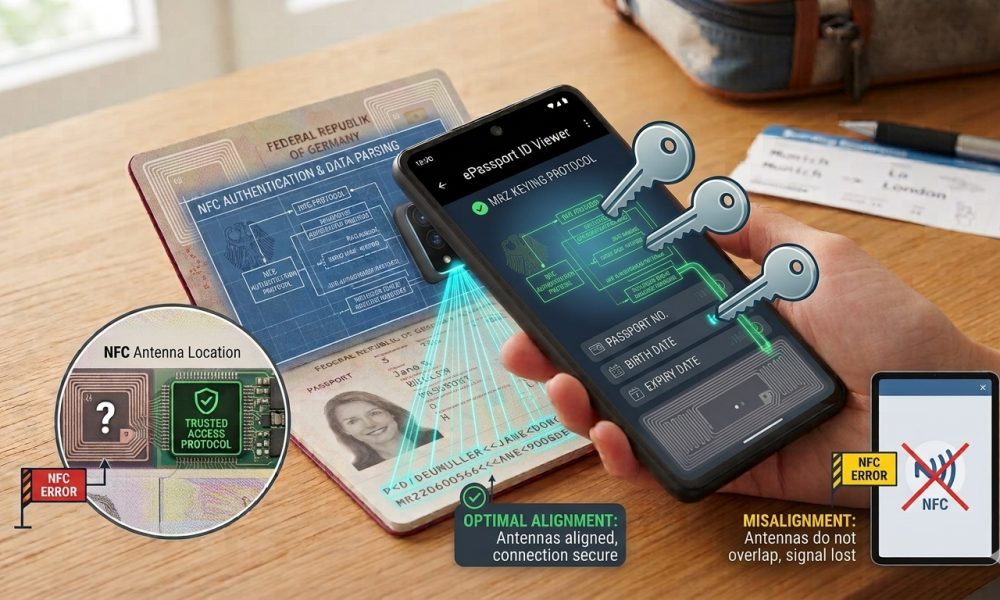
Aligning the phone’s NFC antenna with the passport’s chip antenna can determine whether a reading attempt succeeds.
WASHINGTON, DC, October 2, 2026 — A smartphone can contain fully functional Near Field Communication hardware, and a passport can contain a fully operational electronic chip. Yet, communication can still fail when their antennas are too far apart or misaligned during scanning.
Because electronic passports use short-range contactless communication, successful reading depends upon establishing and maintaining a sufficiently strong electromagnetic coupling between the smartphone’s NFC antenna and the antenna embedded somewhere within the passport booklet, making physical positioning an important part of every mobile scan.
Passport NFC Communication Works at Very Short Range
Electronic passports communicate through contactless technology designed for close-proximity operation, allowing compatible readers to exchange information with the embedded integrated circuit without requiring exposed electrical contacts or a physical connector between the reader and document.
That convenience still requires the reader’s antenna to stay close enough to the passport antenna for reliable communication, which is why moving a smartphone only a few centimeters can sometimes determine whether an apparently identical reading attempt succeeds.
The Passport Contains More Than a Tiny Chip
When people imagine an electronic passport, they often picture only a small integrated circuit. Still, contactless operation also requires an antenna structure that allows the chip to receive energy and exchange radio-frequency signals with compatible inspection equipment.
The ICAO electronic passport specifications recognize several permitted locations for the integrated circuit and antenna within an electronic machine-readable travel document, including the data page, booklet center, cover, or a separately incorporated page.
There Is No Universal Passport Antenna Position
Because issuing authorities have discretion over the antenna’s location within compliant passport designs, users cannot assume that every electronic passport will respond most strongly when a smartphone touches precisely the same area of the booklet.
One passport may communicate effectively when the phone rests against the back cover. At the same time, another design may produce a stronger connection near the data page, booklet center, or another area containing the embedded antenna assembly.
Smartphones Also Place Their NFC Antennas Differently
The problem becomes more complicated because smartphone manufacturers do not place NFC antennas in one universally standardized physical location, meaning the strongest reading area can differ between phone models even when they use similar operating systems.
Some devices communicate most effectively near the upper rear portion of the handset. In contrast, others can have a broader or differently positioned coupling area, making familiarity with the particular phone useful when repeated passport scans are necessary.
Two Antennas Must Interact Effectively
Successful passport scanning depends on the electromagnetic relationship between the phone’s NFC antenna and the passport’s antenna, not merely on whether the two devices are technically described as NFC compatible.
When those components overlap sufficiently, the phone can energize and communicate with the passport chip. At the same time, poor alignment can weaken the connection enough that the Application never establishes a stable connection.
A Failed Scan Does Not Necessarily Mean a Missing Chip
One of the most common mistakes during consumer passport testing is assuming that an application reporting no chip or failing to begin NFC communication proves that the passport contains no functioning electronic component.
Poor antenna alignment, excessive separation, movement, phone cases, software limitations, incomplete preliminary document capture, or ordinary hardware problems can all produce unsuccessful readings without establishing anything definitive about the passport’s authenticity.
Slow Movement Can Help Locate the Strongest Position
When the Application is ready for NFC communication, moving the back of the smartphone across the passport can help identify the position where the two antenna systems establish the strongest connection.
Once the Application indicates that communication is established, keeping the devices in that position generally provides a more reliable result than continuing to move the phone. At the same time, the app exchanges d commands and passport data.
Passport NFC scanning involves more than momentarily detecting the electronic component because the Application may need to establish access, Secure communication, retrieve several data groups, process biometric information, and perform supported cryptographic checks.
Moving the phone away immediately after the first vibration or connection indication can interrupt a session that began correctly but has not yet completed the electronic procedures required by the passport-reading software.
Keeping the Passport Stable Also Matters
Holding both the smartphone and passport at the same time can create unnecessary movement, especially when users try to stay aligned while watching the phone’s display for instructions or progress updates.
Placing the passport on a stable, nonmetallic surface and positioning the smartphone against the likely antenna area can make maintaining the contactless connection easier during applications that take several seconds to process.
The Passport May Need to Be Opened Differently
Because chip and antenna placement varies across passport designs, some reading attempts improve when the booklet is opened to the identity page, while other documents respond better when the phone is placed against a closed cover.
Users should follow instructions from reputable passport-reading software and adjust positioning gradually, rather than repeatedly tapping the phone against random parts of the booklet and treating unsuccessful contact as evidence of electronic failure.
Phone Cases Can Increase the Effective Distance
A thick protective case can increase the separation between the smartphone antenna and passport antenna, potentially weakening contactless communication when the two systems already operate near the limits of a reliable scanning position.
Cases containing card holders, metal components, magnets, or other materials can add complications, making temporary removal reasonable when a passport repeatedly fails to connect despite otherwise correct scanning procedures.
Metal Can Affect Contactless Communication
Because NFC communication relies upon electromagnetic fields, nearby conductive or magnetic materials can affect the interaction between the reader and contactless credential, particularly when they sit directly between the smartphone and passport.
A clear reading environment helps eliminate unnecessary variables, especially when the initial goal is to determine whether a compatible phone and passport can establish stable communication.
Passport Covers Can Sometimes Complicate Testing
Protective travel wallets, aftermarket covers, card sleeves, and other accessories can add distance or use materials that affect contactless performance, even if they have no effect during normal physical handling.
Removing external accessories during troubleshooting helps ensure the smartphone communicates as directly as possible with the passport, rather than trying to operate through additional layers introduced by the holder.
The Phone Must First Reach the Correct Software Stage
Perfect physical alignment cannot produce a meaningful passport scan if the Application has not completed the preceding steps required to establish chip access, which commonly include capturing or entering machine-readable document information.
Specialized applications coordinate optical document recognition with NFC processing, so successful hardware positioning matters only after the software has the information and protocol support needed to begin communicating with the electronic travel document.
The MRZ and NFC Stages Solve Different Problems
Camera capture provides the passport number, birth date, expiration information, and related machine-readable values that supported access mechanisms need. At the same time, NFC positioning determines whether the phone can exchange the resulting electronic messages with the chip.
A user can therefore complete the optical stage perfectly and still experience an NFC failure caused entirely by antenna placement, just as perfect physical positioning cannot compensate for incorrectly captured document information.
A Connection May Start Before the User Notices
Modern passport applications can detect the chip quickly when alignment becomes favorable, sometimes producing a vibration, sound, progress indicator, or immediate transition to another screen once communication begins.
Users should treat that signal as an instruction to hold the phone steady, not as confirmation that the complete passport reading has finished, because substantial electronic processing can continue afterward.
Some Passport Files Take Longer to Retrieve
Biometric images and other electronic records can require more data transfer than basic document information, so the phone may need to stay aligned longer. At the same time, the Application reads and processes the complete Application information.
Applications performing digital-signature validation or additional Authentication procedures can also continue working after basic identity data have been retrieved, creating another reason to avoid disturbing the phone prematurely.
A Weak Connection Can Fail Partway Through
An antenna position can sometimes be strong enough to begin communication but insufficiently stable to support the entire transaction, resulting in scans that repeatedly progress partway before terminating unexpectedly.
Small adjustments that improve overlap between the phone and passport antennas can improve reliability considerably, particularly when failures consistently occur after communication has begun rather than before the chip is detected.
Repeated Partial Reads Can Point Toward Positioning
When an application repeatedly recognizes the passport chip but loses communication during data retrieval, the pattern can indicate unstable coupling rather than the complete absence of an electronic component.
Keeping the smartphone stationary, reducing intervening materials, and carefully experimenting with nearby positions can help distinguish a positioning issue from circumstances that require further technical evaluation.
The Phone Model Can Change the Best Technique
A scanning position that works reliably with one smartphone should not necessarily work identically with another because antenna shape, location, power management, NFC controller design, and case construction can differ materially.
Organizations performing frequent mobile identity checks therefore benefit from understanding the physical NFC characteristics of their supported devices rather than treating every handset as an interchangeable passport reader.
Passport Design Can Change the Best Position Too
Governments periodically redesign passports and can change booklet materials, data-page construction, chip configuration, or antenna placement while still complying with international requirements for electronic travel documents. As a result, the most effective phone position can vary even between two legitimate passport generations issued by the same government, making flexible scanning instructions more useful than a single fixed rule claiming universal applicability.
The International Standard Allows Design Flexibility
ICAO permits issuing authorities to place the contactless integrated circuit and antenna in several locations within the passport, while requiring the completed electronic travel document to meet applicable performance and interoperability requirements.
That design flexibility helps governments integrate electronics with different security materials and booklet constructions. It also explains why consumer smartphone users sometimes need to try more than one physical location before establishing a successful connection.
Professional Readers Reduce Positioning Uncertainty
Dedicated passport readers generally provide a controlled document placement area and antenna configuration designed specifically for electronic travel-document processing, reducing much of the trial and error associated with handheld smartphones.
Smartphones trade that controlled geometry for portability and convenience, which makes user positioning more important even though the underlying passport can communicate successfully with both types of compatible equipment.
Specialized Apps Can Guide the User
Purpose-built passport applications often provide animations, diagrams, vibration feedback, progress indicators, or troubleshooting instructions that help users locate the NFC reading area and maintain the connection throughout processing.
The Regula mobile document-reading platform demonstrates how passport-specific mobile software works directly with device NFC hardware to process contactless identity-document chips rather than relying upon generic tag-reading behavior.
The Application cannot physically move the antenna. The Application can tell the user when communication begins and can retry certain electronic operations. Still, programming alone cannot overcome large physical separation between the smartphone antenna and the passport antenna.
Reliable passport scanning therefore remains a combination of sophisticated software and relatively simple physical positioning, with each becoming ineffective when the other part of the interaction fails.
NFC Detection Alone Is Not Complete Verification
Once positioning succeeds, users should still distinguish between detecting the chip, retrieving its information, validating digitally signed records, performing supported anti-cloning checks, and completing any biometric or physical examination required by the verification purpose.
Good alignment enables those electronic procedures, but it does not turn initial NFC contact into proof that every security characteristic associated with the passport has been authenticated.
A Successful Read Confirms Electronic Communication
When a specialized Application maintains communication long enough to retrieve expected passport records, the result provides useful evidence that the smartphone successfully interacted with a responsive contactless component within the document.
Stronger conclusions concerning the authenticity of the stored information require additional cryptographic validation, while conclusions concerning the physical passport still require appropriate examination of the booklet and its security features.
Digital Signatures Remain a Separate Security Layer
After retrieving passport data, capable applications can perform Passive Authentication by evaluating digitally signed security information and checking whether protected electronic records remain consistent with the references established during legitimate issuance.
The phone’s physical location determines whether those records can be obtained reliably. In contrast, cryptographic verification determines whether the resulting electronic information provides trustworthy evidence of the issuing authority and data integrity.
Chip Authentication Can Add Further Evidence
Where the passport supports appropriate mechanisms, additional cryptographic procedures can provide evidence that the responding electronic component possesses secret credentials expected from the legitimate chip rather than merely presenting copied static passport information.
Again, none of those procedures can begin successfully unless the radio-frequency connection remains sufficiently stable, making correct antenna positioning a practical prerequisite for more sophisticated electronic Authentication.
Physical Passport Security Remains Outside the NFC Connection
A perfectly aligned smartphone can communicate with the passport chip. Still, it cannot assess many physical safeguards, including ultraviolet printing, tactile features, holographic behavior, watermarks, microprinting, laser engraving, or binding construction.
NFC scanning should therefore complement physical document examination rather than encouraging users to interpret a technically successful electronic session as proof that every component of the booklet remains genuine.
The Holder Still Needs Separate Verification
Correct phone placement cannot establish whether the person holding the passport is its legitimate owner because NFC communication involves the document and the electronic reader, not the person presenting the credential.
A separate facial comparison or other human examination remains necessary whenever verification requires establishing the relationship between the authenticated passport and the person attempting to use it.
Government Status Is Also Outside the Antenna Test
A passport can communicate flawlessly with a smartphone after being reported lost, stolen, canceled, or revoked because those administrative changes do not necessarily alter the contactless electronics embedded when the government originally issued the document.
Current passport status therefore requires authoritative external information rather than conclusions based upon the strength, speed, or reliability of the NFC connection alone.
Troubleshooting Should Proceed Systematically
When a scan fails, users can distinguish several variables by first confirming that the Application completed its required documentation, then testing careful phone positioning, reducing intervening materials, and maintaining stability after communication begins.
This measured approach produces more useful information than repeatedly changing several conditions at once, because it helps reveal whether the difficulty comes from optical capture, NFC coupling, software support, smartphone hardware, or the passport itself.
Positioning Problems Are Especially Easy to Misinterpret
Someone unfamiliar with short-range contactless communication can reasonably expect that bringing the phone near the passport should produce the same result every time, especially when other consumer NFC functions seem relatively forgiving.
Electronic passports expose the limits of that assumption because antenna placement varies across phones and documents. At the same time, secure reading often needs the connection to stay stable for much longer than a brief contactless payment interaction.
Passport Reading Differs From Contactless Payment
Contactless payment terminals typically use purpose-built reader hardware with prominent target areas and controlled antenna designs, allowing consumers to approach a clearly defined location for a relatively standardized transaction.
A smartphone passport scan reverses that relationship because both the phone and document can conceal their antennas, leaving the app user responsible for finding the position where those hidden components interact effectively.
The Best Position Is the One That Produces Stable Communication
Users do not need to know the passport’s precise antenna layout to perform a legitimate scan because careful movement and Application feedback can identify the practical reading area without opening, modifying, or physically examining the document’s internal electronics.
Once communication begins, staying in that position until the Application reports completion generally minimizes the risk of damage while determining exactly where the integrated circuit sits within the passport’s construction.
A Passport Should Never Be Damaged to Locate the Chip
The antenna and integrated circuit are intentionally embedded within the travel document, and users should never cut, separate, bend aggressively, puncture, or otherwise damage passport materials merely to determine where those components are located.
The correct approach relies upon non-destructive smartphone positioning and reputable software, preserving both the physical security features and electronic integrity of the government-issued travel document.
Mobile Scanning Makes Antenna Placement More Visible
Professional border equipment hides much of the positioning problem by controlling where travelers place their documents. In contrast, smartphones expose the physical relationship between reader and passport because the user manually brings two hidden antenna systems together.
This makes consumer scanning particularly useful for understanding that NFC communication is not simply a software event. Still, it’s a radio-frequency interaction that requires close physical proximity before cryptographic passport processing can even begin.
Placement Is Only the First Technical Requirement
Through Amicus International Consulting’s passport security resource, readers can examine how smartphone NFC communication works alongside machine-readable information, access control, secure messaging, digital signatures, chip Authentication, physical inspection, and biometric holder verification.
Correct alignment solves the fundamental communication problem between the smartphone and passport, while specialized software and cryptographic procedures determine what happens after the connection is established.
A Few Centimeters Can Separate Failure From a Successful Scan
Passport NFC scanning depends upon bringing the smartphone’s reader antenna close enough to the passport’s embedded antenna for the two devices to establish and maintain stable contactless communication throughout the electronic reading procedure.
Because antenna locations vary across devices and passport designs, a failed attempt often reflects positioning rather than a defective chip, especially when the app, document information, and smartphone support electronic passport processing.
The practical lesson is straightforward: users should position the phone carefully, move it gradually until communication begins, keep it stationary during processing, and interpret persistent failures cautiously rather than treating one unsuccessful alignment as proof of a passport problem.