
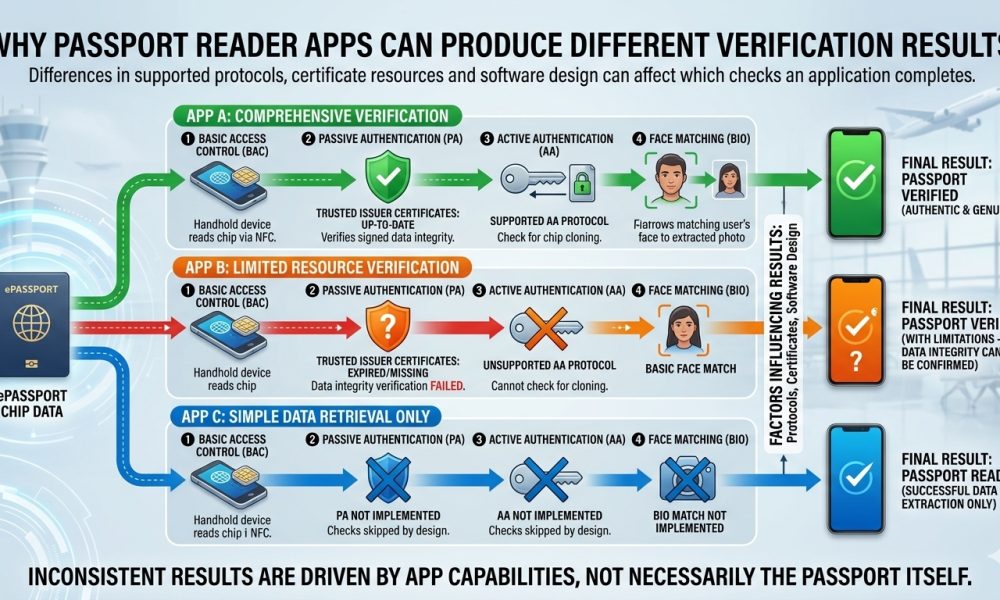
Differences in supported protocols, certificate resources, and software design can affect which checks an Application completes.
WASHINGTON, DC, October 5, 2026, Two smartphone applications can scan the same electronic passport and display different verification results without necessarily demonstrating that one Application has discovered a counterfeit document, because passport Authentication depends heavily upon which protocols, cryptographic certificates, algorithms, and validation procedures each Application actually supports.
The difference can become particularly confusing when one Application displays several green indicators. At the same time, another reports incomplete verification or unavailable Authentication, even though both applications successfully retrieve the same name, photograph, passport number, nationality, expiration date, and other electronic information from the contactless chip.
Reading the Same Chip Does Not Guarantee the Same Verification
Electronic passport applications generally begin similarly by establishing communication with the chip and retrieving standardized information. Still, the verification procedures after that initial access can differ substantially based on each Application’s technical architecture and available Authentication resources.
One Application might stop after confirming that the chip can be read and that the retrieved information matches the Machine Readable Zone. At the same time, another might additionally perform Passive Authentication, certificate-chain validation, Active Authentication, Chip Authentication, biometric comparison, and other supported security checks.
As a result, identical underlying passport data can produce different final screens because each Application may answer a different set of security questions rather than applying one universally identical test to the document.
Passive Authentication Depends on More Than Reading Data
Under ICAO Doc 9303, Passive Authentication requires an inspection system to examine the passport’s Document Security Object, verify its Document Signer certificate through the appropriate country-level trust structure, calculate hashes from relevant data groups, and compare those values with the signed hashes stored within the document.
ICAO’s worked Authentication process distinguishes these operations clearly, requiring verification of the Document Security Object using the Document Signer public key, validation of that signer through the Country Signing Certification Authority public key, and comparison of calculated data-group hashes against their signed reference values.
An Application that lacks one of the certificates required to complete those steps can therefore read the passport successfully but cannot establish the same level of issuer trust as another Application with the appropriate cryptographic material.
Certificate Libraries Can Produce Different Outcomes
Trusted certificates are one of the main reasons passport applications can disagree, because a reader needs appropriate Country Signing Certification Authority material before it can establish that a Document Signer certificate belongs within the recognized cryptographic infrastructure of the claimed issuing country.
ReadID’s published documentation illustrates this distinction by categorizing passports as documents it can fully read and verify, partially verify, or only read, depending partly upon whether its certificate resources contain the country-signing certificates necessary to complete verification.
Consequently, an Application reporting that it cannot establish certificate trust may be describing a limitation in its own trust store rather than establishing that the passport’s digital signature is necessarily fraudulent, particularly when another appropriately configured system possesses the required trusted certificate.
Certificate Updates Also Matter
Government signing infrastructures do not remain completely static because countries can introduce new Document Signer certificates, replace signing keys, renew certificate hierarchies, change document generations, and update cryptographic arrangements as passport programs evolve.
An Application maintaining an older or incomplete certificate repository may therefore encounter a legitimate newer document whose signing infrastructure it cannot fully validate. In contrast, another Application with a more current trust store can complete the required certificate path successfully.
This difference shows why a message such as “certificate unavailable,” “issuer not trusted,” or “verification incomplete” must be distinguished from a genuine cryptographic signature failure, because those messages can describe very different technical conditions that require different interpretations.
Apps Do Not Necessarily Support the Same Protocols
Electronic passports can support multiple Authentication mechanisms, including Passive Authentication, Active Authentication, Chip Authentication, Basic Access Control, Password Authenticated Connection Establishment, and other mechanisms associated with different generations and implementations of electronic Machine Readable Travel Documents.
One Application may support Passive Authentication but not perform the optional anti-cloning protocol supported by a particular passport. In contrast, another Application may successfully execute both procedures and therefore display additional verification results for the same physical document.
ICAO guidance recognizes that reader capabilities depend substantially on software, with standard equipment potentially supporting contactless chip reading and Passive Authentication. In contrast, additional Authentication and inspection capabilities depend on how the receiving system has been configured.
Active Authentication Support Can Create Different Screens
When a passport supports Active Authentication, a compatible Application can send a fresh cryptographic challenge and determine whether the chip possesses the expected private key associated with the authenticated public key stored within the electronic document.
An Application that implements this procedure might display an additional successful anti-copying result. In contrast, another Application lacking Active Authentication support could omit the test entirely or describe the capability as unavailable without indicating any defect in the passport.
Users should therefore distinguish between a protocol that was attempted and failed, a protocol that the passport does not support, and a protocol that the Application itself cannot perform, because those three outcomes carry substantially different technical meanings.
Chip Authentication Creates Another Possible Difference
Chip Authentication can similarly produce different results among applications because the protocol requires support for specific cryptographic key-agreement procedures that allow the reader and passport chip to establish new session keys while providing evidence that the chip possesses its expected protected private key.
A technically advanced Application capable of completing that protocol might report evidence of chip Authenticity that another Application never attempts to obtain, even though both applications successfully perform Passive Authentication against the same electronically signed passport information.
This difference should not automatically be interpreted as disagreement over whether the passport is genuine, because the applications may perform different numbers of independent tests and present those results with different levels of technical detail.
Software Design Influences How Results Are Presented
Applications also differ in how they translate complex cryptographic events into user-facing language, with some products showing separate results for data-group hashes, Document Signer validation, Country Signing Certification Authority trust, Active Authentication, and Chip Authentication. In contrast, others compress several operations into one general Authentication indicator.
One Application could therefore display a single green “document verified” message after completing several successful procedures. At the same time, another could show five separate technical results that include four successful checks and one unsupported feature, creating an apparently less favorable screen despite providing considerably more information.
This presentation problem becomes especially important when screenshots support Authenticity claims, because the visual appearance of an Application result can be misleading unless the reader understands precisely which underlying procedures produced each symbol or message.
Failure and Unavailability Are Not the Same Thing
A verification procedure that actually runs and returns an invalid cryptographic result presents a materially different situation from an Application stating that it lacks the certificates, algorithms, hardware access, or software support required to conduct that verification in the first place.
Similarly, an unavailable anti-cloning test should not automatically be described as a failed anti-cloning test, because the first result means no meaningful conclusion was reached. In contrast, the second indicates the protocol was attempted and produced an outcome inconsistent with the expected cryptographic response.
Applications that clearly distinguish “passed,” “failed,” “not supported,” and “not checked” give users substantially more useful information than interfaces that reduce every incomplete procedure to the same warning symbol.
Smartphone Hardware Can Also Affect the Process
Although much of passport Authentication depends on software, mobile hardware and operating-system behavior can affect whether an Application maintains a stable NFC connection to retrieve every data group or complete longer cryptographic exchanges reliably.
Different phones can have different antenna positions, NFC performance characteristics, operating-system restrictions, and communication stability, meaning a procedure that succeeds quickly on one device can occasionally terminate prematurely on another device without demonstrating anything unusual about the passport itself.
Repeated communication failures should therefore be separated from cryptographic Authentication failures, particularly when the Application reports that communication with the chip ended before the Authentication protocol could be completed.
Different Algorithms and Document Generations Add Complexity
Passport technology has evolved over many years, so verification applications must handle documents issued under different generations of standards, cryptographic algorithms, certificate structures, and national implementation choices rather than a single, uniform electronic passport design.
Applications that support a wider range of legacy and current algorithms can therefore authenticate documents that narrower implementations might read but cannot fully verify, especially when older passports remain legally valid while newer applications increasingly optimize their software around contemporary security architectures.
This variability explains why professional document-verification platforms maintain extensive document and certificate resources, rather than assuming that successful NFC communication automatically makes every international passport cryptographically equivalent from the reader’s perspective.
A Different Result Does Not Automatically Mean a Different Passport
When two applications disagree, investigators should first determine exactly which check produced the different result before concluding that one Application discovered fraud, because comparing overall green and red indicators without examining individual procedures can hide important differences in software capability.
One Application might possess the appropriate national certificate while another does not; one might support the passport’s anti-cloning mechanism while another does not; or one might use more conservative wording when a procedure remains incomplete.
The technically meaningful comparison therefore examines each stage separately, including chip access, data retrieval, data-group integrity, digital-signature verification, issuer-certificate trust, supported anti-cloning mechanisms, and biometric comparison, rather than comparing only the applications’ final graphical summaries.
Physical Examination Provides an Independent Layer
Electronic Application results should also be considered alongside the passport’s physical security characteristics, because cryptographic Authentication evaluates important electronic protections but does not replace examination of materials, personalization, printing, optical elements, ultraviolet features, and other characteristics incorporated into the physical document.
As Amicus International Consulting explains in its passport-security guidance, reliable document assessment depends on several overlapping security layers, and a readable chip or an isolated successful Authentication result cannot independently answer every question about Authenticity, validity, or lawful possession.
A document producing inconsistent Application results therefore deserves a structured review of the specific electronic checks involved, combined with appropriate physical examination and additional verification where necessary, rather than an immediate conclusion based solely upon which Application displayed the more reassuring symbol.
The Detailed Results Matter More Than the Final Icon
Passport reader applications remain valuable because they make sophisticated electronic-document inspection available through ordinary smartphones. Still, their results become most meaningful when users understand exactly which Authentication procedures each product attempted and what resources were available when those procedures ran.
Two applications can consequently produce different verification results without creating a genuine contradiction, because differences in certificate availability, protocol support, cryptographic algorithms, software architecture, NFC communication, and presentation logic can all influence how the same electronic passport is evaluated and described.
For travelers, compliance professionals, investigators, financial institutions, immigration specialists, and anyone assessing electronic travel documents, the safest approach is to examine the underlying verification details rather than assume matching green checkmarks are required before two applications can be considered technically consistent.