
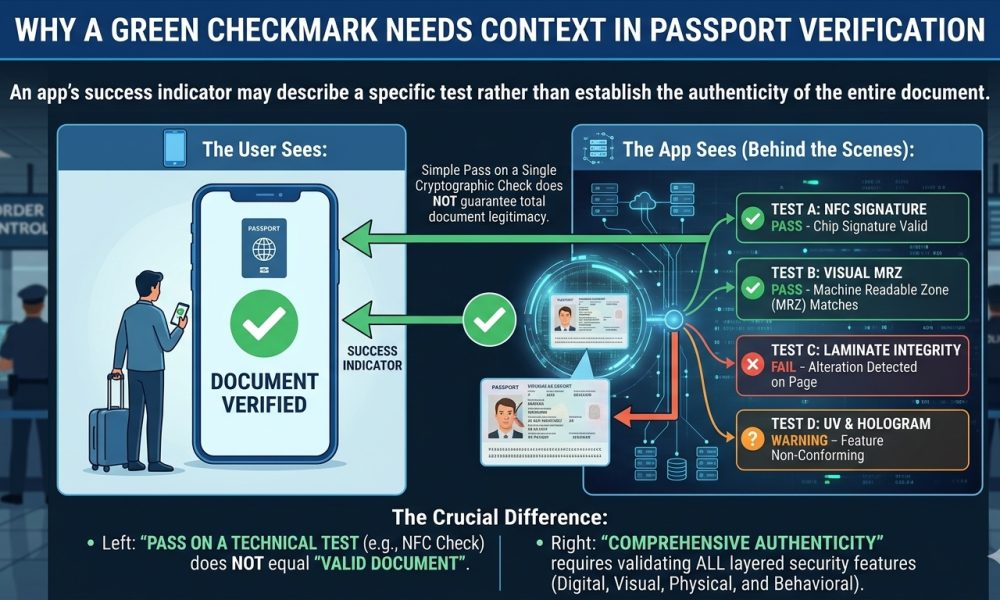
An app’s success indicator may describe a specific test rather than establish the Authenticity of the entire document.
WASHINGTON, DC, October 5, 2026, A green checkmark displayed by a smartphone passport reader can provide useful evidence that a particular electronic verification step succeeded. Still, users should understand precisely what the Application tested before treating a single visual indicator as proof that an entire travel document is unquestionably genuine.
As electronic passports have become increasingly accessible to consumers through NFC-enabled smartphones, verification applications have simplified complex cryptographic processes into familiar visual symbols, including green checks, warning icons, and red failure indicators, helping ordinary users understand results without requiring specialized knowledge of public-key infrastructure.
One Checkmark Can Represent One Specific Test
A passport reader may perform several separate operations during a single scan, including reading the Machine Readable Zone, establishing access to the contactless chip, retrieving electronic data groups, comparing printed and electronic information, checking digital signatures, examining certificate chains, and performing supported chip-authentication procedures.
Because these processes answer different security questions, a green indicator beside one operation should normally be interpreted as confirmation that the particular test succeeded according to the Application’s implementation, rather than as a universal declaration covering every physical, electronic, biometric, and governmental characteristic of the passport.
For example, successful NFC communication may establish that the phone communicated with a compatible contactless chip and retrieved readable information. In contrast, a successful cryptographic Authentication result addresses a considerably different question involving the integrity and signing of protected electronic data.
Passive Authentication Has a Defined Purpose
The international framework described in ICAO Doc 9303 establishes Passive Authentication as a mechanism for verifying digitally signed electronic passport information, using the Document Security Object and cryptographic hashes associated with data groups stored inside the document’s integrated circuit.
In this process, the reader calculates hashes from protected information retrieved from the chip and compares them with hashes contained in the digitally signed security object, allowing the inspection system to determine whether relevant electronic information has changed since the issuing process created the signature.
A successful result can therefore provide substantial evidence of electronic data integrity, particularly when the Document Signer certificate is properly validated through an appropriate trusted certificate chain. Still, it does not independently answer every other question an examiner might have about the passport.
Certificate Trust Changes the Meaning of the Result
Digital signature verification and issuer trust are related. However, they are separate concepts, because software may establish that information corresponds mathematically to a particular signing certificate while still requiring an appropriate trusted Country Signing Certification Authority certificate to establish that the signer belongs to the recognized issuing infrastructure.
This distinction matters in consumer applications because different products can maintain different certificate repositories, obtain trust material through different channels, update those repositories at different intervals, and present certificate-chain information to users with substantially different levels of technical detail.
Consequently, a user seeing a green Passive Authentication result should determine whether the Application merely verified the signature and data-group hashes or whether it also established the Document Signer certificate’s trusted relationship with an appropriate national trust anchor.
A Successful Chip Read Is Not the Same as Authentication
One of the easiest mistakes in passport verification occurs when users interpret successful NFC access as Authentication, even though reading information from an electronic passport chip and cryptographically verifying that information represent distinct operations within a complete electronic document examination.
A smartphone Application can retrieve the holder’s portrait, biographical information, document number, nationality, expiration date, and other accessible electronic information without that retrieval alone demonstrating that every element originated through legitimate governmental issuance procedures.
Professional-grade verification therefore examines what happened after the chip became readable, including whether signed hashes matched, whether certificates validated properly, whether supported anti-cloning mechanisms succeeded, and whether the electronic information matched the visible document and its physical personalization.
Passive Authentication Does Not Prevent Exact Copying
ICAO’s electronic passport architecture expressly distinguishes Passive Authentication from mechanisms intended to detect chip substitution or duplication, because verification of signed data can establish that protected information remains authentic and unchanged without necessarily proving that the reader is communicating with the original physical chip.
This means correctly copied electronically signed information could continue producing valid integrity results if an examiner relies only on Passive Authentication, which is one reason the ICAO framework recommends combining electronic Authentication with appropriate physical examination and additional security mechanisms where supported.
Active Authentication and newer Chip Authentication approaches address a different security objective by requiring the chip to demonstrate possession of protected cryptographic information, thereby helping an inspection system determine whether electronic passport data resides on the genuine chip rather than an unauthorized substitute.
Physical Passport Examination Still Matters
A genuine passport is not merely an NFC chip surrounded by paper or polycarbonate, because governments build modern travel documents with multiple overlapping security layers, including specialized substrates, secure printing, personalization techniques, ultraviolet features, optically variable elements, tactile structures, perforations, laser engraving, and other anti-counterfeit technologies.
As Amicus International Consulting has previously explained in its examination of modern passport security, reliable assessment depends upon evaluating multiple security layers together rather than allowing one successful electronic test to replace physical, optical, biometric, and documentary inspection procedures.
A forged booklet containing copied electronic information, an altered document containing a legitimate chip, or a genuine passport presented by an unauthorized person can create very different investigative problems, even though one or more electronic checks might still produce apparently favorable results.
The Printed Page and Electronic Record Should Agree
Another important stage involves comparing information printed or engraved on the passport’s data page with information obtained electronically, because discrepancies between visible personalization, the Machine Readable Zone, and chip contents can indicate that further investigation is necessary.
Names, document numbers, nationality information, dates of birth, expiration dates, facial images, and other corresponding fields should therefore be reviewed together when available, rather than letting a cryptographically valid electronic component overshadow inconsistencies elsewhere in the document.
This comparison becomes especially important when investigators examine suspected page substitution or unauthorized physical alteration, because legitimate signed chip information can potentially coexist with physical characteristics that deserve independent scrutiny and cannot be evaluated through cryptographic Authentication alone.
Facial Matching Represents Another Separate Question
The digital portrait stored within an electronic passport can also support facial comparison. Still, successful retrieval of that portrait should not be confused with confirmation that the person presenting the passport is actually the legitimate holder identified by the document.
Border systems and commercial identity platforms can compare a live facial Image against the portrait contained inside the authenticated chip, creating another independent layer of verification that addresses the relationship between the document and the person standing before the Camera.
A passport Application that displays separate indicators for chip access, Passive Authentication, facial comparison, and data consistency therefore describes several distinct tests, and interpreting those results individually provides far more information than treating the final screen as a single binary Judgment.
Government Database Status Is Another Layer Again
Even a comprehensive local examination of a passport cannot necessarily determine whether the issuing government subsequently canceled, revoked, reported, or administratively invalidated that document, because those status questions may require access to governmental, border-management, or law-enforcement systems unavailable to ordinary consumer applications.
A passport could therefore retain technically valid physical and cryptographic characteristics while no longer remaining valid for international travel, demonstrating why document Authenticity, document integrity, holder verification, and current governmental status should be understood as separate investigative questions.
Organizations performing regulated identity verification frequently combine document examination with sanctions screening, lost-and-stolen-document checks, identity databases, biometric comparisons, and other risk controls because no single cryptographic result answers every compliance or identity question associated with an international travel document.
Consumer Applications Simplify Complex Results
Applications understandably use green checkmarks because most users cannot reasonably be expected to interpret certificate objects, signature algorithms, hash functions, data-group structures, trust anchors, or electronic passport security protocols every time they scan a document using a smartphone.
The simplification becomes problematic only when users assign the symbol a broader meaning than the underlying test supports, particularly when an Application does not make clear whether a successful result represents NFC communication, data consistency, cryptographic integrity, certificate trust, or another specific operation.
Developers such as ReadID describe multiple stages of electronic identity and passport verification, showing why users evaluating results should review the underlying Authentication details rather than relying solely on the overall appearance of a successful scan screen.
Red Indicators Also Require Context
The same principle applies when an Application displays a red warning, because a failed test does not automatically establish that the document is fraudulent, particularly when technical conditions involving certificate availability, software compatibility, NFC communication, unsupported security protocols, or outdated trust stores can affect individual verification processes.
An examiner should therefore identify precisely which stage failed, determine whether the failure can be repeated using appropriate equipment, inspect related security characteristics, and avoid reaching a definitive Authenticity conclusion solely because one consumer Application could not complete one electronic operation.
Repeated failures involving signed data, certificate validation, physical security characteristics, inconsistent personalization, or other independent indicators can become far more significant when considered together, which illustrates why professional document examination relies on converging evidence rather than a single application-generated symbol.
The Strongest Verification Comes From Multiple Layers
The most defensible passport assessment combines physical inspection, printed-data examination, MRZ validation, electronic chip reading, signed-data verification, certificate trust validation, supported anti-cloning checks, biometric comparison, and relevant database inquiries whenever the examiner has lawful access to those capabilities.
Each successful stage strengthens the overall assessment because independent security mechanisms protect against different attack methods. At the same time, each inconsistency creates an opportunity to investigate further instead of relying on assumptions from an oversimplified green-or-red interface.
A green checkmark can therefore represent valuable evidence. Still, its real meaning comes from understanding exactly what the Application examined, what trust material it used, what security functions it did not test, and how that particular result fits within the broader verification of the passport as a complete document.