What Is a GaN Charger? Demystifying the Technology
A GaN charger is a power adapter that uses Gallium Nitride semiconductor material instead of traditional silicon to convert electrical current and charge your devices. While that might sound technical, the practical difference is transformative. Think of it this way: if silicon-based chargers are like single-lane country roads for electricity, GaN chargers are multi-lane highways—electrons flow through Gallium Nitride with far less resistance, allowing for faster, more efficient power conversion. This fundamental shift in material science unlocks three critical advantages that matter in real-world use. First, GaN chargers achieve significantly higher power density, meaning they can pack 65W, 100W, or even more charging capacity into a form factor up to 50% smaller than silicon equivalents. Second, they generate substantially less heat during operation because the improved electron efficiency means less energy is wasted as thermal byproduct, eliminating the need for bulky heat sinks. Third, they operate with greater overall energy efficiency, converting more wall power into actual device charging rather than losing it to heat. The evolution from silicon to GaN represents the most significant leap in charging technology since USB became standard—what once required a brick-sized adapter now fits comfortably in your palm, without sacrificing an ounce of performance.
Why GaN Chargers Are a Game-Changer for Traveling Professionals
Unmatched Portability and Space Savings
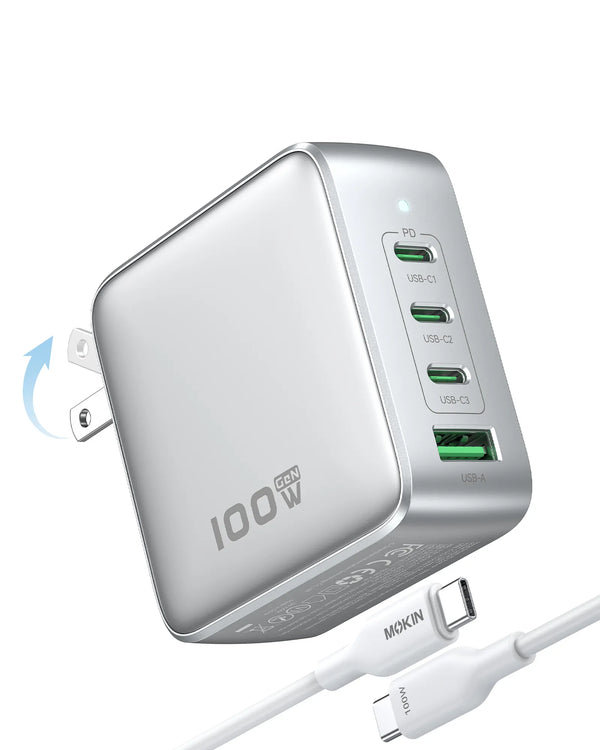
The difference in physical footprint is staggering. A traditional 65W laptop charger typically measures around 2.5 x 2.5 x 1.2 inches and weighs close to half a pound—that’s before you account for the attached cable. A GaN equivalent delivers the same power in a package roughly the size of a standard phone charger, often 30-40% smaller and lighter. For professionals navigating TSA checkpoints or working from hotel rooms with limited outlet access, this translates to tangible freedom. Your carry-on gains precious space for documents or an extra shirt, and your briefcase no longer sags under the weight of charging infrastructure. Even more compelling are multi-port GaN chargers that consolidate your entire charging ecosystem into one device. Instead of packing separate adapters for your laptop, phone, and tablet, a single 100W three-port GaN charger handles all three simultaneously, eliminating cable spaghetti and reducing your tech kit to one elegant solution.
Power and Speed for Every Device
When you’re between meetings with 20 minutes to spare, charging speed isn’t a luxury—it’s a necessity. GaN technology enables chargers to deliver high wattage outputs that would have been impossible in compact form factors just a few years ago. A quality GaN charger can push 100W through a single USB-C port, enough to fast-charge even power-hungry 16-inch laptops at full speed while simultaneously topping up your phone and wireless earbuds through additional ports. This matters because modern fast-charging protocols like USB Power Delivery 3.0 and Programmable Power Supply require both high wattage and intelligent power negotiation—capabilities that GaN chargers excel at providing. The practical result? Your MacBook Pro can gain 50% charge in 30 minutes, your smartphone reaches 80% in under half an hour, and you’re never tethered to an outlet longer than absolutely necessary.
Versatility Across Your Tech Ecosystem
Today’s traveling professional carries an interconnected web of devices: a laptop, smartphone, tablet, noise-canceling headphones, smartwatch, and perhaps an e-reader or portable battery. The old approach required a different charger for each, or at minimum, multiple adapters competing for limited hotel outlet space. A well-designed GaN charger with three or four ports—typically a mix of USB-C and USB-A—becomes your universal power hub. Plug your laptop into the primary high-wattage USB-C port, your phone into the secondary USB-C port, and legacy devices like your Kindle or older headphones into USB-A ports. Intelligent power distribution ensures each device receives optimal charging current automatically, without you needing to understand amperage or voltage. This consolidation doesn’t just reduce clutter; it fundamentally simplifies your travel routine, transforming the nightly ritual of device charging from a juggling act into a single, effortless connection.
Choosing the Right GaN Charger: A Buyer’s Guide for Professionals
Step 1: Assess Your Total Power Needs (Wattage)
Before you purchase, take inventory of what you’ll actually charge simultaneously. Check the power requirements printed on each device or in its specifications—your 13-inch laptop might need 60W, your 16-inch workstation could demand 96W, your phone typically draws 18-30W, and accessories like earbuds or smartwatches need 5-10W each. Add these numbers together for your peak scenario: if you’re charging a 60W laptop, 20W phone, and 10W earbuds at once, you need at least 90W total capacity. For traveling professionals, a 65W charger works for lighter setups with one laptop and a phone, but a 100W or higher model provides comfortable headroom for multiple devices without compromising charging speed. Remember that most GaN chargers intelligently distribute power—a 100W charger might allocate 65W to your laptop and split the remaining 35W between two other ports when all are in use. Build in a buffer of 10-20W above your calculated minimum to ensure each device charges at optimal speed rather than throttling down due to insufficient power availability.
Step 2: Prioritize Port Configuration and Count
The ideal port setup depends on your device ecosystem. A two-port charger with dual USB-C outputs suits minimalists carrying just a laptop and phone, both with modern USB-C charging. Three-port models—typically two USB-C and one USB-A—hit the sweet spot for most professionals, accommodating your primary devices plus one legacy accessory. Four-port chargers offer maximum flexibility but add slight bulk, worthwhile if you regularly charge a laptop, phone, tablet, and smartwatch simultaneously. Pay attention to port power distribution: the best designs feature at least one port capable of delivering the charger’s full wattage for laptop fast-charging, with secondary ports providing 20-30W each for phones and tablets. Avoid chargers where power splits evenly across all ports, as this often means none can adequately fast-charge a laptop. USB-A ports remain valuable for older devices, fitness trackers, Kindles, and wireless headphone cases that haven’t transitioned to USB-C, so having at least one maintains backward compatibility without forcing you to carry adapters.
Step 3: Consider Form Factor and Build Quality
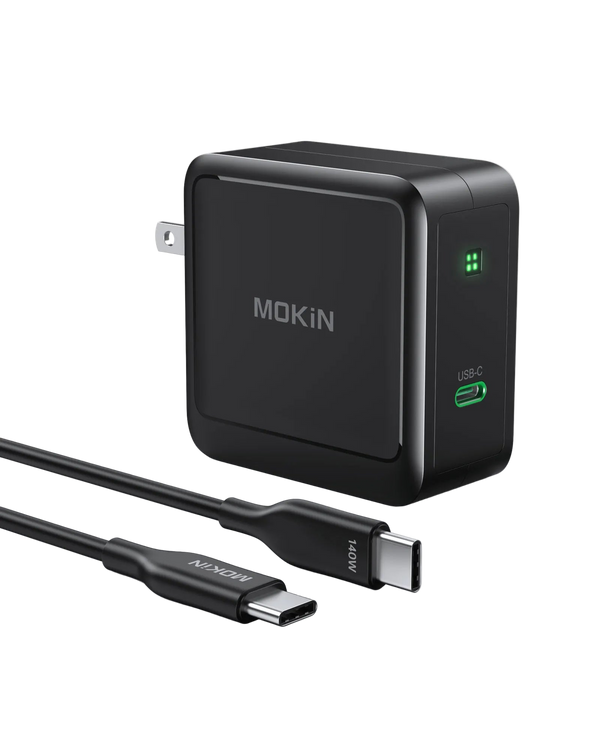
Physical design matters when you’re living out of a carry-on. Foldable prongs prevent the charger from snagging on clothing or scratching other items in your bag, while also reducing overall dimensions for tighter packing. Weight becomes noticeable when you’re carrying tech gear daily—look for chargers under 200 grams for 65W models and under 300 grams for 100W versions. Build quality directly impacts longevity and safety: premium chargers feature fire-resistant polycarbonate housings, reinforced port connections that withstand thousands of plug cycles, and comprehensive safety certifications including UL, CE, and FCC marks that verify protection against overcurrent, overvoltage, and overheating. Brands like MOKiN have built reputations specifically around robust construction and reliable performance in travel scenarios, incorporating thoughtful details like LED indicators that don’t glow too brightly in dark hotel rooms and textured finishes that resist scratches. A well-built GaN charger should feel substantial without being heavy, with ports that grip cables firmly and prongs that lock securely in both folded and deployed positions.
Step 4: Look for Essential Travel Features
International compatibility is non-negotiable for frequent travelers. Verify the charger accepts 100-240V input, allowing it to work anywhere from Tokyo to London without a voltage converter—just pack the appropriate plug adapter for different outlet types. Some premium models include interchangeable plug heads for different regions, eliminating even that small hassle. Cable considerations matter equally: detachable cables are superior to fixed ones because you can replace them if damaged and swap in shorter cables for desk use or longer ones for airport charging stations. If the charger includes cables, ensure they’re rated for the full power output and feature robust strain relief at connection points. Compact overall dimensions—ideally no larger than a deck of cards for 100W models—ensure the charger fits easily in laptop bags’ accessory pockets or even jacket pockets. Finally, consider whether the design allows multiple chargers to sit side-by-side in a power strip without blocking adjacent outlets, a surprisingly common frustration with poorly designed wide-body chargers that monopolize outlet space.
Maximizing Your GaN Charger: Tips and Best Practices
Owning a GaN charger is just the starting point—using it strategically transforms your travel charging from adequate to optimized. Start with port prioritization: always connect your highest-wattage device (typically your laptop) to the primary USB-C port, which usually delivers the maximum power output. Secondary ports handle phones and tablets efficiently, while USB-A ports are perfect for lower-power accessories like wireless earbuds or smartwatches. This hierarchy ensures your most critical device charges at full speed without power throttling. When packing your tech kit, embrace minimalism by pairing your GaN charger with a single high-quality USB-C cable rated for 100W or higher—this one cable can charge everything from your phone to your laptop, eliminating the need for device-specific cords. Always use certified cables rather than cheap alternatives; a substandard cable can bottleneck charging speed and even pose safety risks, negating the advantages of your premium charger. For professionals setting up mobile workstations in hotel rooms or airport lounges, your GaN charger becomes a power hub: plug in your laptop for simultaneous charging and operation, keep your phone topped up for hotspot duties, and maintain your wireless peripherals ready for action. Consider keeping your charger in an easily accessible outer pocket of your bag so you can quickly connect at charging stations without unpacking your entire kit. By treating your GaN charger as the centerpiece of an intentionally designed charging ecosystem rather than just another accessory, you’ll eliminate the anxiety of battery management and maintain productivity regardless of location.
Transform Your Travel Charging Experience
Understanding what a GaN charger is reveals why this technology has become indispensable for traveling professionals: it’s a charging solution built on Gallium Nitride semiconductors that delivers transformative benefits impossible with traditional silicon-based adapters. The advantages are clear and measurable—dramatically reduced size and weight that frees up precious carry-on space, high-wattage fast charging that keeps your entire device ecosystem powered without lengthy outlet sessions, and intelligent multi-port designs that consolidate your charging infrastructure into one elegant tool. For professionals who move between offices, airports, hotels, and client sites, a GaN charger isn’t just another tech accessory—it’s a productivity multiplier that eliminates the friction of power management. The days of choosing between portability and performance are over. As you evaluate your current charging setup, consider this: every minute spent untangling cables, every ounce of unnecessary weight in your bag, and every moment of device downtime represents lost efficiency. A quality GaN charger solves all three problems simultaneously. Make the switch to GaN technology, and transform your travel charging from a constant source of frustration into a seamless, reliable system that simply works—everywhere you go, every time you need it.