
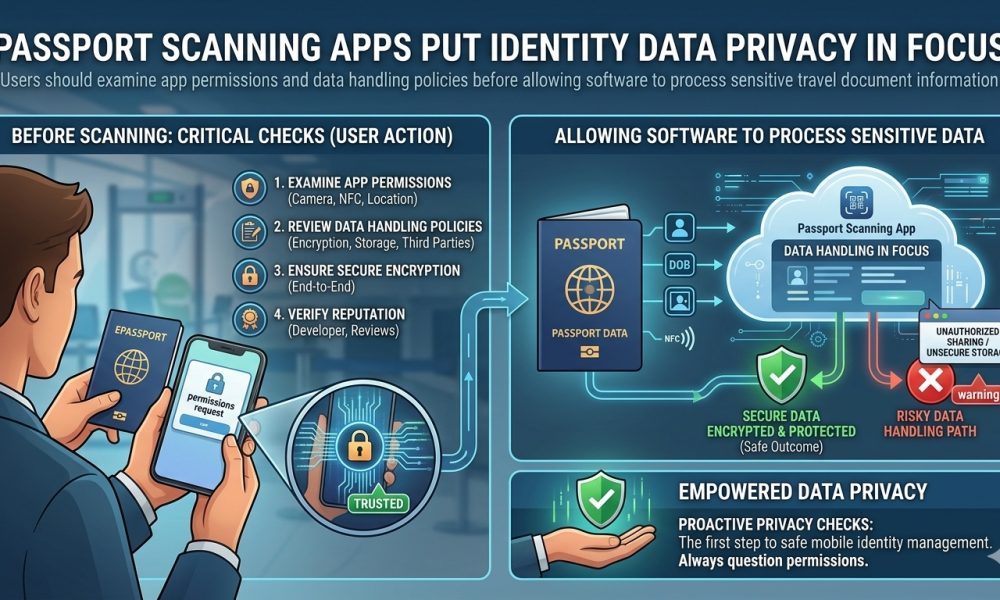
Users should review app permissions and data-handling policies before allowing software to process sensitive travel document information.
WASHINGTON, DC, October 5, 2026, Smartphone applications can now read the electronic chips embedded in modern passports within seconds, giving travelers and identity professionals convenient access to photographs, document numbers, dates of birth, nationality information, and cryptographic verification results once available primarily through specialized inspection equipment.
That convenience also raises an important privacy question: scanning an electronic passport can expose far more sensitive information than users realize, so the Application’s permissions, processing location, network connections, retention practices, third-party integrations, and privacy policy matter before a passport ever touches the back of a smartphone.
A Passport Contains Highly Valuable Identity Information
A modern electronic passport contains a concentrated collection of information that can identify a person internationally, including the holder’s full name, date of birth, nationality, document number, expiration information, a digitally stored facial portrait, and other standardized information depending on the issuing country and document configuration.
Because those details can become valuable components of identity fraud, account takeover attempts, social engineering, unauthorized profiling, or fraudulent verification processes when improperly obtained, passport information deserves substantially stronger privacy consideration than ordinary Application data such as entertainment preferences, search histories, or general device settings.
An NFC chip does not inherently make passport scanning unsafe because electronic passports include access controls and cryptographic protections, but the privacy equation changes once authorized software reads the information and determines what happens to it after retrieval.
The First Question Is Whether Data Leaves the Phone
One of the most important distinctions users should consider is whether a passport Application processes information locally on the smartphone or transmits it to remote servers, because those two architectures create substantially different privacy and security considerations.
An Application that scans and authenticates entirely on the device can minimize external exposure. In contrast, an Application designed for commercial identity verification may legitimately transmit photographs, document details, verification results, or other information to cloud infrastructure for analysis, storage, compliance, fraud prevention, or customer-account purposes.
Neither architecture should automatically be considered improper, because legitimate services can require server-side processing. Still, users should understand which model applies before scanning a passport rather than assuming that information displayed on a smartphone necessarily remains confined to that device.
App Store Privacy Information Provides a Starting Point
Apple requires developers distributing applications through its marketplace to disclose categories of information their applications and integrated third parties may collect, giving users an initial way to examine whether information can become associated with their identity, used for tracking, or processed for other declared purposes.
Users considering an unfamiliar passport Application can therefore review the developer’s disclosures through Apple’s App Privacy information before installation, while recognizing that marketplace disclosures should complement, not replace, examination of the Application’s complete privacy policy and the reputation of the organization responsible for the software.
Pay particular attention to disclosures involving identifiers, photographs, contact information, diagnostics, usage information, sensitive data, and other categories that could interact with passport processing, especially when the Application’s advertised purpose appears considerably narrower than the permissions or collection practices described.
Android Users Have Similar Privacy Information Available
Google also provides a Data safety section through Google Play where developers describe what their applications collect or share, the security practices associated with that information, and other aspects of how user data moves through the Application ecosystem.
Before installing software that can process a passport, Android users can review the app’s Google Play Data safety information alongside its requested permissions, developer identity, update history, privacy documentation, and information on whether data stays on the device or moves to external infrastructure.
Google also distinguishes between Application permissions and developer-declared data collection, an important difference because an Application can access information locally without necessarily transmitting it elsewhere. At the same time, some information can also be collected through mechanisms that do not correspond neatly with a visible operating-system permission.
Camera Permission Can Expose More Than the Passport Chip
Most passport applications require Camera access because they initially scan the Machine Readable Zone printed on the passport’s identity page, allowing the software to obtain information needed for subsequent communication with the electronic chip and reducing the need for users to enter document details manually.
Camera access is reasonable for that purpose, but users should still determine whether photographs or video frames remain temporarily in memory, are stored on the device, are sent to a remote server, are fed into analytics systems, or are retained after the scanning process has finished.
Applications performing facial identity verification may also capture a selfie or live facial sequence and compare it against the portrait stored in the passport chip, creating another category of sensitive biometric processing that deserves careful examination before consent is provided.
NFC Access Reveals the Electronic Passport Record
Once the Application establishes appropriate access to the passport chip, it can retrieve standardized electronic information that may include biographical details and the high-quality facial Image stored within the travel document, depending upon the information accessible through that passport’s configuration and the capabilities of the Application.
A digital portrait extracted directly from the chip can be considerably more useful for automated identity verification than a photograph casually taken from the physical passport page, which also means users should understand whether the Application retains, transmits, analyzes, or deletes that portrait after Authentication concludes.
The important privacy question is therefore not simply whether an Application can technically read the passport, but whether users understand the complete lifecycle of the information after the Application gains legitimate electronic access to the document.
Local Processing Can Reduce Some Exposure
Applications designed to complete optical recognition, NFC reading, and cryptographic Authentication locally can reduce the number of external systems that receive passport information, which can limit opportunities for interception, secondary processing, centralized data breaches, or unexpected retention beyond the user’s device.
Local processing does not automatically guarantee privacy, however, because an Application can still include analytics components, crash-reporting software, advertising frameworks, third-party libraries, telemetry services, or other code that generates network traffic even when its primary passport-reading functions operate locally.
Users seeking stronger privacy should therefore examine the developer’s statements concerning both passport data and supporting Application services, rather than assuming that a claim describing local NFC processing necessarily applies to every category of information generated while the software is running.
Cloud Processing Requires Different Questions
Commercial identity-verification applications often depend upon server infrastructure because organizations may need centralized fraud detection, audit records, regulatory compliance, account onboarding, document comparison, or human review, making remote processing a legitimate component of many professional verification environments.
In those circumstances, users should look for clear explanations concerning where passport information is transmitted, whether encryption protects it during transfer and storage, which organizations can access it, how long it remains retained, and whether subcontractors or other processing partners participate in the verification workflow.
A privacy policy that merely says information may be collected to provide services offers far less useful information than documentation explaining the categories collected, the purposes involved, the retention framework, sharing relationships, security measures, and procedures for requesting access or deletion where applicable.
Retention Policies Matter After the Scan Ends
Many users focus on what happens during a passport scan. Still, a more consequential privacy question is what happens days, months, or years later if the Application developer or verification provider retains the information after the immediate Authentication purpose ends.
A passport number eventually expires, but names, birth dates, nationality information, historical document records, and facial characteristics can remain useful identifiers for long periods, meaning indefinite or poorly explained retention creates a fundamentally different risk profile from temporary processing followed by reliable deletion.
Users should therefore check whether the developer describes specific retention periods, purpose-based deletion rules, user-controlled deletion options, legally mandated retention requirements, or circumstances under which passport information may remain after an account closes or verification finishes.
Third-Party Software Deserves Attention
Modern mobile applications commonly incorporate external software development kits for analytics, diagnostics, crash reporting, customer support, fraud detection, advertising, Authentication, or other functions, meaning sensitive data can potentially interact with organizations beyond the company whose name appears directly on the Application listing.
Users don’t need to become software engineers to scan a passport. Still, they should look for privacy documentation that identifies meaningful categories of service providers and explains whether those organizations receive identity information, biometric information, device identifiers, usage information, or only limited technical diagnostics.
This consideration becomes especially important when a supposedly simple passport utility requests numerous unrelated permissions or includes advertising and behavioral tracking features that seem unnecessary for reading and cryptographically verifying an electronic travel document.
Permissions Should Match the App’s Stated Purpose
A passport reader may reasonably need Camera and NFC functionality, while an Application offering document storage or account management could require additional capabilities; however, permissions involving contacts, precise location, microphones, extensive file access, or unrelated device functions deserve closer scrutiny when their necessity is unclear.
Unexpected permissions do not automatically prove malicious behavior because software architectures and operating systems can create legitimate technical requirements. However, users should expect responsible developers to explain why sensitive access is necessary and what information becomes available after granting permission.
The safest approach is to grant only the permissions needed for the function being used, review operating-system privacy controls periodically, and revoke unnecessary access when the Application no longer needs capabilities that were previously authorized.
Screenshots Can Create a Separate Privacy Problem
Even when the passport Application itself protects information appropriately, users can unintentionally create additional copies by taking screenshots of verification screens containing names, facial images, document numbers, Machine Readable Zone information, Authentication details, or other identifying data.
Those screenshots may then sync with cloud photo libraries, appear in automated backups, become available to other apps with photo-library access, or remain on devices long after the original passport-reading app has discarded its temporary information.
Sharing passport-reader screenshots through email, messaging platforms, online forums, or technical-support channels creates another distribution pathway, so conceal sensitive fields whenever complete identity information isn’t needed to answer the underlying question.
Public Wi-Fi Introduces Another Consideration
Applications that transmit passport information to remote infrastructure should use strong encryption regardless of the network. However, travelers handling particularly sensitive identity information may still prefer trusted connections over unfamiliar public wireless networks when circumstances permit.
A properly designed Application should not rely on Wi-Fi network secrecy to protect transmitted passport information, because modern transport encryption should provide that security layer, although avoiding unnecessary networks can still reduce exposure to unrelated connection risks and deceptive access points.
Users should also keep operating systems and applications updated, since security patches often address vulnerabilities in browsers, networking components, NFC frameworks, cryptographic libraries, and other software identity-processing apps may depend on.
Deleting the App Does Not Necessarily Delete Remote Data
Removing a passport reader from a smartphone can prevent future local access, but deleting the Application itself does not necessarily erase information previously transmitted to the developer, a verification provider, a cloud storage environment, or another third-party service participating in the process.
Users concerned about information already submitted should therefore consult the developer’s privacy controls and deletion procedures rather than assuming that uninstalling the Application automatically removes remote records associated with previous passport scans.
Where privacy laws or provider policies permit access, correction, or deletion requests, users may also need to contact the organization directly and verify whether identity-verification records remain subject to legal, fraud-prevention, security, financial, or regulatory retention obligations that limit immediate deletion.
Biometric Information Requires Particular Care
The facial Image contained inside an electronic passport represents more than an ordinary photograph when software uses it for automated biometric comparison, because mathematical representations derived from facial characteristics can become highly sensitive identity information within modern verification systems.
A reputable Application should therefore make clear whether it merely displays the passport portrait, compares the Image locally against a selfie, transmits both images to a server, creates a biometric template, performs liveness analysis, or retains verification outputs for subsequent fraud-prevention purposes.
These distinctions matter because two applications that appear almost identical to an ordinary user can operate under fundamentally different data-processing models, with one functioning as a local document reader while another forms part of a remotely operated identity-verification platform.
Security and Privacy Are Related but Different
An Application can accurately perform Passive Authentication, Active Authentication, or Chip Authentication while still implementing data-handling practices that some users consider inappropriate, because cryptographic passport verification establishes facts about the document rather than determining how the Application treats information after retrieving it.
Conversely, an Application can follow restrictive privacy practices yet provide comparatively limited document Authentication, meaning users should evaluate security capability and privacy Protection as separate dimensions instead of assuming excellence in one automatically guarantees excellence in the other.
As Amicus International Consulting explains in its broader examination of passport security, electronic Authentication is only one component of modern travel-document Protection. At the same time, responsible identity handling must also protect information security and privacy after legitimate access occurs.
Travelers Should Treat Passport Data as Sensitive From the Beginning
Before scanning an electronic passport, users should identify the Application developer, obtain the software from an official distribution channel, review requested permissions, examine available privacy disclosures, understand whether information leaves the device, and determine whether the Application’s purpose justifies the amount of information being processed.
Users should also consider whether they genuinely need to scan the passport at all, because unnecessary duplication of highly sensitive identity information creates additional exposure without producing any corresponding security benefit when the verification serves no meaningful purpose.
Passport reader applications can help you understand electronic travel documents and verify their cryptographic protections. Still, the ability to read sophisticated identity technology from an ordinary smartphone makes informed privacy decisions increasingly important for anyone placing a passport against a mobile device.
The most useful question before beginning a scan is therefore not merely whether the Application can read the passport successfully, but who will receive the resulting information, where that information will be processed, how long it will remain available, and whether those practices are appropriate for one of the most sensitive identity documents a traveler possesses.