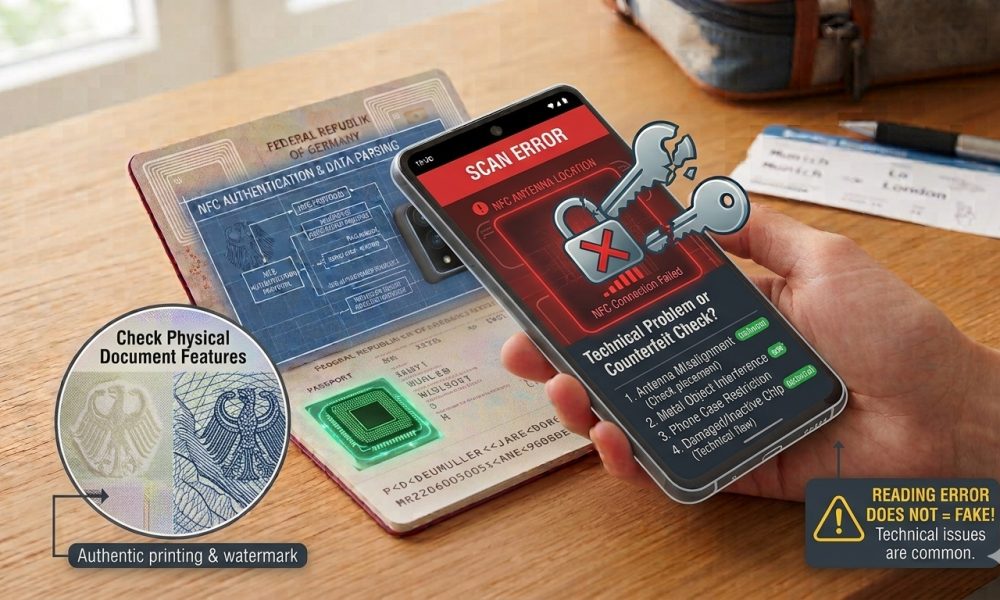
Thick or metal-containing accessories may disrupt communication between a smartphone and an electronic travel document.
WASHINGTON, DC, October 2, 2026 — When a smartphone repeatedly fails to read an electronic passport, the problem may not come from the passport chip or mobile app but from the protective case, wallet attachment, magnetic mount, or other accessory around the phone.
Near Field Communication depends upon close electromagnetic coupling between antennas inside the smartphone and passport, meaning additional distance or interfering materials between those components can weaken communication enough to prevent detection, interrupt an established session, or produce inconsistent reading results.
Passport NFC Depends on Close Physical Coupling
Electronic passports contain a contactless integrated circuit connected to an antenna embedded within the document. At the same time, compatible smartphones have their own NFC antennas that generate and receive the radio-frequency signals required for communication.
The ICAO electronic passport specifications define contactless electronic travel documents around internationally standardized radio-frequency technology, allowing compatible inspection equipment to communicate with the passport without exposed electrical contacts.
A Phone Case Adds Another Layer Between the Antennas
Every protective case creates some additional physical separation between the smartphone antenna and the passport, although thin plastic or silicone cases often have little practical effect under favorable scanning conditions.
The difficulty becomes more noticeable when a thick case adds distance and imperfect antenna alignment, leaving the two contactless systems close to the threshold where communication can no longer remain stable.
NFC Has a Much Shorter Working Distance Than Wi-Fi or Bluetooth
Consumers accustomed to wireless technologies operating across rooms can understandably expect NFC to work whenever the phone is generally close to a passport. Still, contactless document communication uses a dramatically shorter effective distance.
Small changes in separation therefore matter more, meaning several additional millimeters from a heavy-duty protective case can sometimes affect a passport scan, even though the same accessory creates no noticeable problem for longer-range wireless services.
Case Thickness Is Only One Part of the Problem
A thick case does not automatically prevent passport scanning because antenna design, phone model, passport construction, positioning, and the materials inside the accessory all influence the resulting radio-frequency interaction.
Some users can read passports reliably through substantial protective cases. In contrast, others may repeatedly struggle with comparatively modest accessories because their phone and passport antennas require closer or more precise alignment.
Metal Components Can Affect the Electromagnetic Field
Phone cases with metal plates, decorative metallic layers, kickstands, rings, or structural elements can affect the electromagnetic environment around the NFC antenna and reduce contactless coupling efficiency.
When those materials sit directly between the smartphone and passport, they matter more because the passport depends on the reader’s field for both communication and powering the passive electronic component during the session.
Magnetic Mount Plates Can Be Easy to Overlook
Drivers sometimes place thin metal plates inside smartphone cases so magnetic vehicle mounts can hold the handset securely, creating an accessory that may remain invisible during ordinary use.
A plate positioned near the NFC antenna can interfere with passport scanning even if the user considers the phone case ordinary plastic, making hidden accessories worth considering during troubleshooting.
MagSafe and Magnetic Accessories Add Another Variable
Modern smartphones can use magnetic attachment systems for chargers, wallets, stands, and other accessories, introducing magnets and conductive structures close to internal wireless components.
These accessories do not necessarily prevent NFC passport reading, but removing detachable magnetic equipment during troubleshooting eliminates another variable when communication remains unreliable.
Card-Holder Cases Can Create Several Sources of Interference
Wallet-style phone cases can place payment cards, access cards, Identification credentials, metallic foils, magnets, and additional layers directly behind the smartphone, creating a complicated contactless environment around the reader antenna.
Removing cards or temporarily taking the phone out of the case can make troubleshooting more reliable because the Application then communicates with the passport without other contactless credentials or materials nearby.
Contactless Cards Can Complicate the Reading Environment
A smartphone positioned near several contactless cards and an electronic passport simultaneously can encounter a more complicated radio-frequency environment than one involving the passport alone.
Even when the Application ultimately selects the correct document, removing unrelated cards during testing reduces unnecessary variables and lets the user focus specifically on communication between the phone and passport.
RFID-Blocking Phone Accessories Can Defeat the Scan Intentionally
Some wallets and protective products contain conductive materials designed specifically to attenuate radio-frequency communication, meaning they can prevent legitimate passport reading for the same reason they are marketed as Protection against unwanted contactless access.
A passport Application cannot overcome an effective physical radio-frequency barrier simply through better software because the phone and document still need an adequate electromagnetic connection before any electronic protocol can begin.
Passport Wallets Can Produce the Same Problem
Interference doesn’t have to come from the smartphone side, because RFID-blocking passport sleeves, travel organizers, and protective covers can similarly prevent the phone from establishing the close-range communication required for NFC reading.
Removing both the smartphone and passport from unnecessary accessories creates the simplest environment for determining whether the two devices can communicate successfully when no additional material lies between their antennas.
A Failed Scan Through a Blocking Sleeve Says Very Little
If a passport remains inside an accessory designed to reduce contactless communication, a smartphone’s failure to detect the chip provides little meaningful evidence about the document’s condition.
The result may show that the protective product is performing its intended function, so troubleshooting should start by removing external barriers before evaluating the passport itself.
Case Materials Behave Differently
Plastic, silicone, leather, metal, magnetic components, conductive fabrics, embedded batteries, and composite materials can interact differently with the NFC field, meaning case thickness alone cannot predict precisely whether scanning difficulties will occur.
A thin case with strategically placed metal can create more trouble than a thicker nonconductive case, showing why actual scanning behavior matters more than visual assumptions about accessory size.
Battery Cases Can Add Substantial Separation
Protective battery cases can introduce considerably more distance between the smartphone and passport while also containing electronics, batteries, wiring, and other materials absent from ordinary cases.
Users with persistent passport-reading issues can get a more meaningful test by removing the battery case and placing the bare phone directly against the document.
Rugged Cases Can Make Antenna Alignment Harder
Heavy-duty cases often contain multiple layers, reinforced corners, stands, magnets, protective frames, and thicker rear panels, all of which can increase the effective distance between the hidden smartphone and passport antennas.
Even if a case doesn’t interfere electrically, added thickness can make marginal alignment less reliable and require more careful positioning than the same phone would need without the accessory.
The Phone’s NFC Antenna Is Already Hidden
Users usually cannot see exactly where the NFC antenna sits inside a smartphone, and a thick case further separates the handset from any visual clue about the strongest reading location.
As a result, scanning through a bulky accessory can involve more trial and error because the user is aligning two invisible antenna systems while additional material weakens their interaction.
Passport Antenna Placement Is Also Hidden
The contactless antenna can be incorporated into different parts of an electronic passport depending upon the document design, so the phone case is only one factor within a geometry that already varies significantly.
The strongest scanning position may occur against a cover, identity page, or another booklet area, depending upon how the issuing authority incorporated the electronic component into the passport.
Removing the Case Can Simplify Antenna Searching
Taking the phone out of its protective case reduces separation. It makes it easier to move the handset slowly across the passport while looking for the point where the Application first establishes communication.
Once the strongest position becomes known, users can determine whether the case genuinely interferes by repeating the same alignment with the accessory installed rather than comparing unrelated positions.
Comparison Testing Produces Better Evidence
A useful troubleshooting approach is to hold every other condition constant while changing only the phone case, allowing the user to determine whether communication improves materially when the accessory is removed.
If the passport reads reliably without the case but repeatedly fails under identical positioning after the case returns, the accessory becomes a much stronger explanation than the passport chip itself.
Phone Placement Still Matters After the Case Is Removed
Removing an accessory cannot compensate for placing the smartphone antenna far from the passport antenna. Hence, users still need to find an appropriate reading location even with a completely bare phone.
The case should therefore be one variable among several, not a universal explanation for every unsuccessful passport scan.
A Thin Case Does Not Guarantee Successful Reading
Even a minimal case can be irrelevant when the real problem involves inaccurate machine-readable information, incompatible software, poor NFC alignment, interrupted communication, or document damage.
Troubleshooting works best when users change one factor at a time rather than assuming the case explains every failure merely because removing accessories is an easy first step.
The Application Must Reach the NFC Stage Correctly
Passport-specific mobile applications normally obtain information from the machine-readable zone before accessing the chip, so a Camera recognition error can prevent communication no matter how little material separates the phone and passport.
Correcting an inaccurate passport number, birth date, expiration date, or check digit can sometimes resolve what initially appears to be a hardware problem.
A Case Cannot Explain Every Error Message.
Some Application failures occur after NFC communication has already succeeded, during electronic access, secure messaging, file retrieval, certificate validation, or another software-controlled stage.
When the Application clearly detects the chip and progresses into electronic processing before failing, accessory interference remains possible but should not automatically become the leading explanation.
Intermittent Reads Are Particularly Consistent With Weak Coupling
A phone that repeatedly detects the passport and then loses communication can be operating near the boundary of reliable antenna coupling, where small movements or additional separation interrupt the electronic session.
Removing a thick or interfering case can improve the margin available to the NFC connection, making communication more stable rather than merely changing whether initial detection occurs.
Stable Communication Matters Beyond Initial Detection
Passport reading may require the phone to stay connected while the app establishes access, negotiates secure messaging, retrieves electronic data groups, and completes supported Authentication procedures.
The strongest configuration is therefore not simply the position that produces one vibration, but the position and accessory arrangement that lets the electronic session continue until the Application confirms completion.
The Stored Facial Image Can Increase the Data Transfer
Retrieving a biometric portrait generally involves transferring much more electronic information than reading a simple text identifier, making stable communication especially useful during the part of the session when the Application downloads biometric data.
A marginal connection can therefore appear to work initially, then fail when longer transfers expose weaknesses caused by movement, separation, or interfering materials.
Cases Can Affect Convenience More Than Authenticity
When removing a phone case suddenly allows a passport to scan correctly, the result explains something about the mobile reading environment rather than changing the underlying identity or validity of the travel document.
The passport did not become more authentic after the accessory was removed because the smartphone established a better radio-frequency connection with the same electronic component.
A Failed Scan With a Case Does Not Prove the Chip Is Damaged
This distinction matters because consumers may interpret repeated unsuccessful attempts as evidence of a defective or missing passport chip when the problem lies entirely outside the document.
Testing without potentially interfering accessories provides a simple, non-destructive way to reduce that uncertainty before seeking more formal assistance.
A Successful Bare-Phone Scan Can Be Reassuring Technically
If a passport scans reliably once the phone case is removed, the result strongly suggests the phone and document can establish electronic communication under suitable physical conditions.
That observation does not authenticate the entire passport. Still, it can resolve the narrower question of whether the earlier failure resulted from the accessory rather than complete absence of NFC communication.
NFC Functionality Is Not the Same as Passport Authentication
A phone establishing communication with the chip does not automatically prove that digitally signed passport information is authentic, because stronger conclusions require cryptographic validation using trusted issuing certificates.
Likewise, removing an interfering case helps the reader obtain electronic data. Still, it does not perform the digital-signature, chip-authentication, physical-document, or holder-verification procedures needed for broader passport assessment.
Specialized Software Remains Necessary
The ReadID Me passport-reading Application demonstrates how purpose-built software coordinates Camera capture and smartphone NFC communication while providing guidance for positioning and troubleshooting electronic travel documents.
Generic NFC utilities remain less useful for this purpose because they may not understand passport access controls, secure messaging, biometric data structures, or the cryptographic checks that distinguish successful chip detection from meaningful electronic verification.
The Phone Case Cannot Affect Government Status.
Whether a case blocks NFC communication has no relationship with whether the issuing government later canceled, revoked, or recorded the passport as lost or stolen, because those administrative decisions exist outside the smartphone’s radio-frequency interaction.
A successful scan without the case therefore provides no independent evidence that the passport remains administratively valid for current international travel.
The Case Also Cannot Affect Holder Identity.
A genuine passport can scan perfectly through a thin case while being carried by someone other than the legitimate holder, because NFC communication evaluates the electronic document rather than lawful possession.
Facial comparison or another appropriate identity-verification process remains necessary when the purpose of the inspection includes determining whether the traveler matches the identity contained in the passport.
Physical Security Features Remain Separate
Removing a phone case makes electronic communication easier. Still, it does not examine holographic devices, ultraviolet features, laser engraving, microprinting, binding construction, watermarks, or other physical security characteristics integrated into the passport.
Electronic scanning should therefore remain one component of a broader verification process rather than replacing examination of the physical credential.
Professional Readers Avoid Many Consumer Accessory Problems
Dedicated passport readers generally use controlled document placement and purpose-built antennas, eliminating smartphone cases, magnetic mounts, card wallets, and many of the alignment variables encountered during handheld scanning.
This difference explains why a passport that proves difficult to read with one consumer phone can still communicate normally with professional inspection equipment designed specifically for electronic travel documents.
Another Phone Can Help Confirm an Accessory Problem
If the passport scans successfully on another compatible smartphone while the original device keeps failing inside its case, the evidence increasingly points to the first phone’s accessory, antenna arrangement, or configuration.
Testing different equipment remains more informative when performed with reputable passport-specific applications and without introducing additional variables such as blocking sleeves or magnetic attachments.
Users Should Avoid Aggressive Physical Testing
Removing a detachable phone case or passport sleeve is reasonable, but users should never cut, peel, bend aggressively, puncture, or otherwise modify a passport while attempting to improve NFC communication.
The electronic component is intentionally embedded within an official security document, so troubleshooting should preserve the document’s physical construction and focus on external accessories, positioning, and compatible software.
Accessories Should Be Removed Before Assuming Passport Failure
When a smartphone repeatedly reports no chip or loses communication, removing the phone case, magnetic attachments, stored contactless cards, and passport wallet provides a straightforward way to eliminate several common environmental variables.
If the document remains unreadable afterward, testing with another compatible device or seeking guidance from the issuing authority can provide more meaningful evidence than repeatedly repositioning a heavily accessorized phone.
Persistent Failure Can Still Reflect a Genuine Hardware Problem
A passport antenna or electronic component can become damaged, so removing phone accessories will not resolve every failed scan, particularly when several compatible readers produce the same result.
Even then, electronic failure does not automatically establish counterfeiting because a legitimately issued passport can suffer hardware damage while its physical booklet and governmental issuance remain genuine.
Issuing Authorities Remain the Appropriate Final Resource
When a passport repeatedly fails to communicate across compatible devices and applications after you’ve ruled out obvious accessory issues, you can seek guidance from the government that issued the document.
That authority can determine whether inspection or replacement is appropriate under its own passport policies, rather than relying solely on conclusions from consumer smartphone testing.
Simple Troubleshooting Can Prevent Misleading Conclusions
The most useful troubleshooting procedures often involve straightforward steps: remove unnecessary accessories, verify the machine-readable information, use passport-specific software, test careful antenna alignment, and keep the phone stationary once communication begins.
These measures can resolve many ordinary reading problems without creating unsupported claims about chip failure, passport authenticity, or government issuance.
The Phone Case Is One Part of a Larger Electronic Chain
Through Amicus International Consulting’s passport security resource, readers can examine how NFC communication interacts with machine-readable information, access controls, digital signatures, chip Authentication, physical examination, biometric verification, and government status checks.
The protective case affects only the radio-frequency connection between reader and document. Still, that connection must function before the specialized software can proceed toward the stronger electronic checks that make passport scanning useful.
Removing the Case Can Turn an Apparent Chip Failure Into a Successful Scan
Thick phone cases, metal plates, magnetic attachments, card wallets, battery accessories, and RFID-blocking materials can weaken or interrupt the short-range electromagnetic coupling required for successful communication with an electronic passport.
Removing those accessories reduces distance and interference, giving the smartphone and passport antennas a better opportunity to establish and maintain the stable contactless session needed for electronic document reading.
A failed scan should therefore be interpreted cautiously until obvious environmental variables have been eliminated, because the difference between an unreadable passport and an ordinary accessory problem can sometimes be as simple as removing the case from the phone.