The restaurant experience has been reimagined. What was once a simple exchange between a customer and a cashier has evolved into a seamless, tech-driven process. Digital ordering has not only transformed how we dine but also how restaurants operate behind the scenes. With a tap, swipe, or scan, customers can place orders in seconds—but what happens next? How does that tap translate into a piping hot meal delivered to your table or packaged to-go?
Understanding what goes on behind the digital curtain reveals the impressive coordination of systems, software, and staff that powers every digital transaction. This article dives into the hidden mechanics of digital ordering—from the customer interface to the kitchen workflow—and explains why this revolution is becoming essential for modern foodservice operations.
Step 1: The Order Interface – Where It All Begins
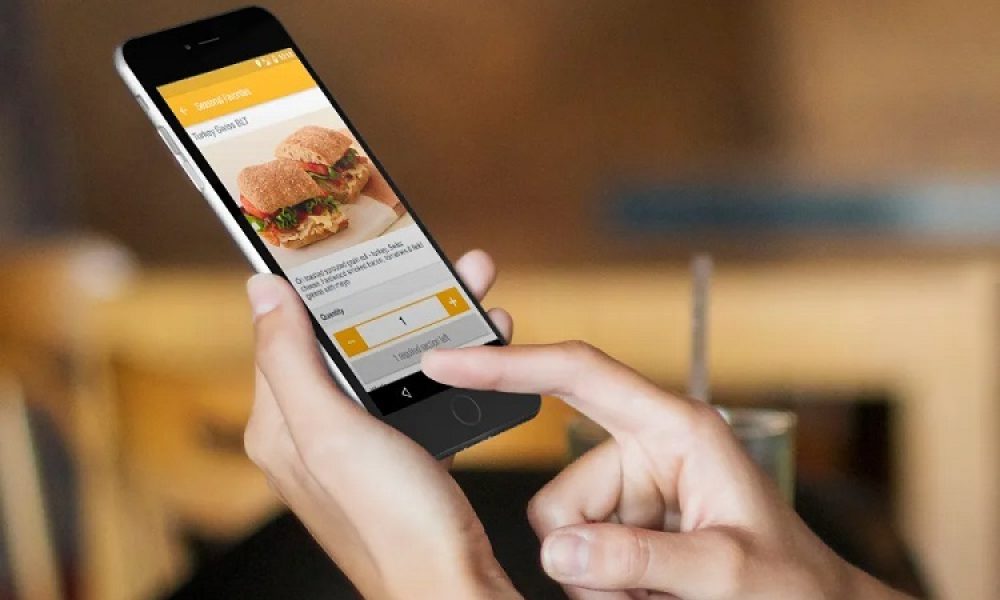
The journey starts when a customer interacts with a digital interface. This can take the form of a self-service kiosk, mobile app, QR code menu, or even a restaurant’s website.
Whether it’s scanning a code at the table or using a touch screen at the entrance, customers are presented with a digital menu. This menu is dynamically managed in the backend, often reflecting real-time availability, pricing, and promotions.
Customers browse, select their items, customize their meal, and confirm their choices. They might remove onions, ask for gluten-free options, or upgrade their fries—all with a few taps. Modern systems are designed for speed and clarity, using rich visuals and intuitive navigation to reduce friction and boost confidence in the order process.
Once the order is finalized, the customer selects a payment method—typically via card, contactless payment, digital wallet, or pre-saved app credentials—and completes the transaction.
Step 2: Secure Payment Processing
Immediately after the order is placed, the system initiates a secure transaction. Digital ordering platforms are integrated with PCI-compliant payment gateways to ensure that customer data is encrypted and safely transmitted.
Some platforms offer integrated loyalty points, discount codes, and promotional pricing, which are all calculated in real time. Confirmation is typically displayed on-screen and sent to the customer via email or app notification.
The system now has two jobs: validating the payment and communicating the order details to the restaurant’s operational platforms.
Step 3: Order Routing to the Kitchen
Once payment is confirmed, the order is automatically sent to the kitchen display system (KDS) or printed at the appropriate station via a connected kitchen printer. This integration is what sets digital ordering apart from traditional methods—it removes manual entry and eliminates the potential for human error.
Routing rules in the software determine where each part of the order goes. For example:
- Burgers and sandwiches are sent to the grill station.
- Salads are directed to the cold prep area.
- Drinks may be sent to a barista or bar station.
In many restaurants, particularly fast-casual or QSRs, orders are displayed on digital kitchen monitors. These screens allow cooks to see orders in real time, mark them as “in progress,” and then complete them when ready. Each step is timestamped, providing valuable data for tracking preparation times and identifying bottlenecks.
Step 4: Synchronized Workflow and Queue Management
Behind the scenes, a digital ordering system does more than just display orders—it manages the entire flow. Advanced platforms prioritize orders based on when they were placed, estimated preparation times, and order type (dine-in, takeout, delivery).
Some systems even sync with delivery aggregators or third-party platforms, sending order information to external drivers or logistics tools. Kitchen staff are alerted when a delivery driver is en route or when a customer has arrived to collect an order. This precision reduces idle time and ensures food quality by minimizing how long an item waits after preparation.
In busy environments, efficient queue management is critical. Digital systems automatically throttle new orders if the kitchen reaches capacity, adjusting estimated wait times shown to customers on the ordering interface.
Step 5: Order Completion and Customer Notification
When the kitchen marks an order as complete, the system may trigger a number of automated actions:
- Visual updates on digital displays showing that the order is ready.
- In-app notifications or SMS alerts letting customers know it’s time to collect.
- Communication with front-of-house staff, so they can deliver food to the table or bag it for pickup.
If the restaurant uses lockers or pickup shelves, the system can even assign a locker number or pickup location, displayed on the customer’s device or receipt.
For delivery, the system may integrate with dispatch services or in-house drivers, providing real-time tracking updates to the customer.
Step 6: Post-Order Analytics and Feedback
The customer journey doesn’t end when the food is served. Behind the scenes, data is collected at every stage:
- What items are popular?
- Which customizations are most common?
- How long does each order take from payment to preparation to delivery?
Restaurant managers use this data to optimize staff scheduling, menu design, and promotional strategies. It also informs kitchen layout decisions, training needs, and supplier management.
Many systems also prompt customers to leave feedback after their meal. This real-time input provides actionable insights and helps maintain quality control.
The Role of Integration and Automation
What makes the digital ordering process so efficient is its ability to integrate various systems—POS, KDS, inventory management, customer relationship management (CRM), and payment processing—into one seamless experience.
A digital ecosystem like QikServe, for example, enables restaurants to build modular systems that match their specific operational flow. Whether it’s a hotel dining experience, a busy fast-casual restaurant, or a stadium concession stand, platforms like this provide the flexibility and connectivity needed to adapt and scale.
Integration ensures fewer manual tasks, faster service, and greater transparency, both for staff and customers.
Why It Matters
In an era where customers expect instant gratification and flawless service, digital ordering provides a crucial edge. It’s not just about the technology—it’s about the orchestration of a well-oiled machine where each component speaks to the next, delivering speed, accuracy, and personalization.
For restaurants, the benefits are clear:
- Reduced order errors
- Faster service times
- Increased average check size
- Better labour efficiency
- Real-time performance monitoring
For customers, it means greater control, less waiting, and a smoother dining experience.
Final Thoughts
From a customer’s tap to the kitchen’s grill, the digital ordering process is a masterclass in modern logistics. While the interface is simple and user-friendly, the behind-the-scenes technology is powerful and deeply integrated. Platforms like QikServe are setting the gold standard for what seamless digital dining should look like.
As more restaurants embrace this model, understanding the mechanics behind it is no longer just useful—it’s essential for staying ahead. Whether you’re a restaurant owner, manager, or tech enthusiast, recognizing how digital ordering works behind the scenes reveals the future of hospitality: connected, efficient, and undeniably digital.