The Rise of Low Power Home Servers: Why Efficiency Matters
A low power home server is a compact computing device designed to run continuously while consuming minimal electricity, typically under 15 watts during operation. These systems deliver substantial benefits including dramatically reduced energy costs compared to traditional desktop computers, silent operation suitable for residential environments, and the ability to maintain 24/7 uptime without financial strain. The demand for self-hosting solutions has surged among tech-savvy individuals who value data sovereignty, customization freedom, and independence from subscription-based cloud services. Common use cases span VPN services that secure internet connections across all household devices, personal cloud storage replacing services like Dropbox, home automation hubs controlling smart devices, and media servers streaming content throughout the home. The hardware selection process proves critical because an underpowered device struggles with multiple concurrent tasks while an overpowered solution wastes electricity and money. Finding the optimal balance between processing capability, memory capacity, storage flexibility, and power consumption determines whether your home server becomes a reliable workhorse or a frustrating bottleneck. The right hardware choice ensures your investment pays dividends through years of efficient, dependable service.
ZimaBlade Unveiled: Key Features and Specifications
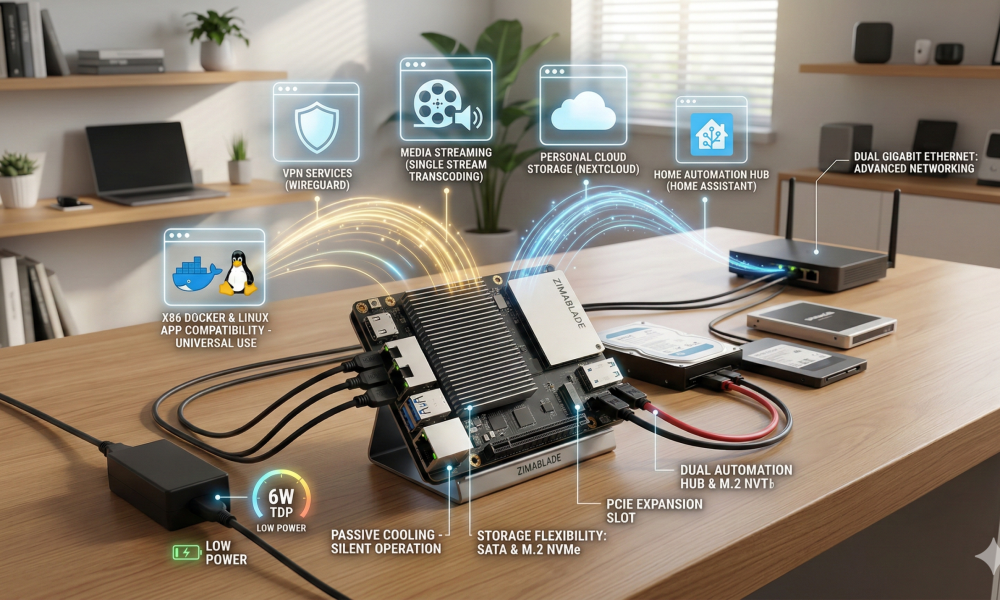
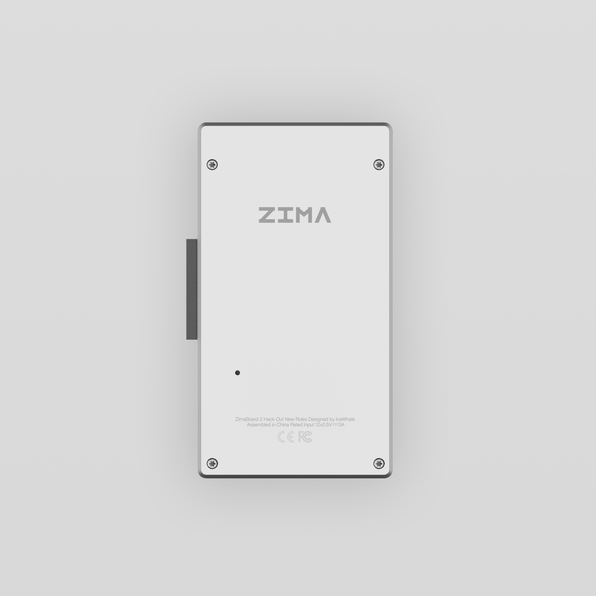
ZimaBlade arrives as a purpose-built low power home server featuring an Intel Celeron N3450 quad-core processor that delivers surprising computational capability while sipping just 6 watts during typical operation. The system ships with configurations offering 4GB to 8GB of LPDDR4 RAM, providing adequate headroom for running multiple containerized applications simultaneously without performance degradation. Storage flexibility stands as a defining characteristic—dual SATA ports accommodate traditional hard drives or SSDs for bulk storage, while an onboard eMMC module handles the operating system, and an M.2 slot enables NVMe expansion for users demanding faster access speeds. The compact aluminum chassis measures roughly the size of a paperback book, dissipating heat passively without fans, ensuring whisper-quiet operation perfect for living spaces. Connectivity options prove remarkably comprehensive for such a diminutive device: dual Gigabit Ethernet ports enable advanced networking configurations including dedicated VPN services or network segregation, while USB 3.0 ports and GPIO headers expand functionality for peripheral devices and hardware tinkering. Software compatibility spans the entire spectrum of popular self-hosting platforms—OpenMediaVault, TrueNAS, Proxmox, and various Linux distributions install seamlessly, giving tech-savvy users freedom to craft their ideal environment. The PCIe expansion slot represents ZimaBlade’s secret weapon, allowing installation of additional network cards, storage controllers, or specialized hardware that transforms this modest device into a genuinely versatile home server platform capable of evolving alongside your needs.
Comparative Analysis: How ZimaBlade Outperforms Other Solutions
Power Efficiency and Cost-Effectiveness
When measured against competing platforms, ZimaBlade demonstrates remarkable electrical efficiency that translates directly into long-term savings. A typical Raspberry Pi 4 consumes approximately 3-5 watts but requires external storage solutions and USB adapters that collectively push consumption to 8-10 watts while introducing cable clutter. Traditional NAS devices from established manufacturers often draw 15-30 watts continuously, accumulating substantial electricity costs over months of operation. ZimaBlade’s 6-watt typical consumption positions it perfectly between these extremes—more capable than single-board computers yet far more economical than conventional NAS hardware. Over a year of continuous operation, this efficiency difference represents tangible savings: ZimaBlade costs roughly $6-8 annually in electricity versus $15-25 for standard NAS devices, assuming average residential rates. The budget-friendly home server equation extends beyond purchase price to encompass total cost of ownership, where ZimaBlade’s passive cooling eliminates fan replacement expenses and its integrated storage options reduce peripheral purchases that inflate competing solutions’ true costs.
Versatility for Self-Hosting Applications
ZimaBlade’s architectural advantages enable genuine versatility across diverse self-hosting scenarios where alternatives falter. Raspberry Pi devices struggle with Docker containers running database-heavy applications due to ARM architecture limitations and modest RAM ceilings, while proprietary NAS systems lock users into vendor-specific software ecosystems that restrict customization. ZimaBlade’s x86 architecture ensures compatibility with virtually any Linux distribution, containerization platform, or self-hosted application without architectural workarounds. The dual Gigabit Ethernet configuration supports advanced networking scenarios impossible on single-port devices—simultaneously running a pfSense firewall on one interface while serving media through the second, or creating isolated networks for IoT devices separate from trusted systems. Real-world performance testing reveals ZimaBlade comfortably handles concurrent Nextcloud file synchronization, Plex media transcoding for single streams, Home Assistant automation, and WireGuard VPN services without resource exhaustion. This capability spectrum positions ZimaBlade as a true general-purpose platform rather than a specialized appliance, adapting seamlessly as your self-hosting ambitions evolve from simple file storage toward comprehensive home infrastructure management. For users exploring network-attached storage solutions, Zima has developed a product line that emphasizes open architecture and user flexibility, allowing enthusiasts to build customized systems that match their specific requirements.
Practical Guide: Setting Up Your ZimaBlade for Self-Hosting Success
Step 1: Initial Hardware and Software Setup
Begin by unboxing your ZimaBlade and connecting essential peripherals—attach a keyboard, monitor via HDMI, and Ethernet cable to your primary network port. Power the device using the included adapter and prepare a USB drive containing your chosen operating system image; Ubuntu Server, Debian, or CasaOS represent excellent starting points for newcomers. Boot from the USB drive by accessing the BIOS (typically pressing F11 or Delete during startup) and selecting your installation media. Follow the on-screen prompts to install the OS onto the internal eMMC storage, creating a user account and configuring basic network settings. Once installation completes and the system reboots, update all packages using your distribution’s package manager to ensure security patches are current. Configure SSH access to enable remote administration, eliminating the need for permanently connected peripherals and allowing headless operation from any device on your network.
Step 2: Configuring for Lightweight Tasks and VPN Services
Install Docker and Docker Compose to simplify application deployment—these containerization tools enable one-command installation of complex services without dependency conflicts. For VPN services, deploy WireGuard through a pre-built Docker container, configuring port forwarding on your router to enable external access while generating client configuration files for your devices. Establish Nextcloud for personal cloud storage by pulling its official container, mapping one of the SATA ports for bulk file storage while keeping the database on faster eMMC storage. Configure the secondary Gigabit Ethernet port for dedicated services or network isolation—assign it a separate subnet for IoT devices or use it as a dedicated VPN interface. Install Portainer through Docker to gain a web-based management interface that simplifies container administration, monitoring resource usage, and deploying additional services as your needs expand without memorizing command-line syntax.
Step 3: Maintenance and Optimization Tips
Establish automated backup routines using rsync or Duplicati to protect configuration files and critical data against hardware failure or configuration errors, scheduling weekly backups to external storage or a secondary location. Configure unattended-upgrades on Debian-based systems to automatically apply security patches, reducing vulnerability windows without manual intervention. Monitor system resources through tools like htop or Netdata to identify performance bottlenecks before they impact service availability. Implement fail2ban to protect SSH and web services from brute-force attacks, automatically blocking suspicious IP addresses. Review Docker container logs periodically to catch application errors early, and prune unused images monthly to reclaim storage space. Enable power management features in your BIOS to ensure ZimaBlade enters low-power states during idle periods, maximizing the efficiency advantages that make it an ideal continuous-operation home server.
ZimaBlade: Your Efficient Self-Hosting Solution
ZimaBlade distinguishes itself in the competitive low power home server landscape through a compelling combination of genuine energy efficiency, architectural versatility, and thoughtful design choices that directly address the needs of tech-savvy self-hosting enthusiasts. Its 6-watt power consumption delivers measurable cost savings over years of continuous operation while the x86 architecture ensures compatibility with virtually any self-hosted application without the limitations plaguing ARM-based alternatives. The comparative analysis reveals ZimaBlade’s sweet spot between underpowered single-board computers and expensive proprietary NAS devices—offering expandability through dual SATA ports, PCIe slots, and dual Gigabit Ethernet that transform it from a simple file server into a comprehensive home infrastructure platform. The practical setup guide demonstrates that deploying VPN services, personal cloud storage, and containerized applications remains accessible to both newcomers and experienced users, with maintenance requirements minimal enough for set-and-forget reliability. For individuals seeking genuine control over their digital life without sacrificing efficiency or budget, ZimaBlade represents not just another hardware option but a purposeful solution engineered specifically for the self-hosting journey. Explore ZimaBlade today to build the reliable, efficient home server infrastructure you’ve been planning.